At the very core of the OAuth2 authorization framework is a mechanism that allows a client application to access a protected resource on behalf of an end user — based on that user’s approval — without exposing the user’s credentials to the client. OAuth2 achieves this by introducing a new authorization layer and issuing a temporary credential, known as an access token, with the help of an authorization server — typically an identity provider.
OAuth2 defines three distinct roles:
- Client — the application acting on behalf of the end user
- Authorization Server — issues access tokens and manages user interactions
- Resource Server — hosts the protected resource
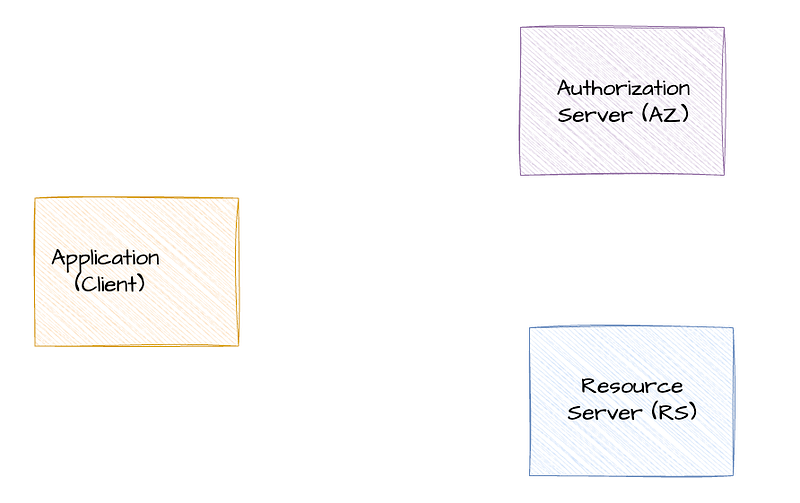
The core OAuth2 specification, along with several related standards, outlines how these roles interact. Let’s revisit these interactions in more detail.
Interactions between Client and Authorization Server
The interaction begins when a client application retrieves the metadata of the authorization server by sending an HTTP GET request to its metadata endpoint. The structure of this metadata and the endpoint URL itself are defined by the OAuth2 Authorization Server Metadata specification, which is now widely adopted.
How do you discover the OAuth2 server configuration?
_This is the 2nd post of my blog series about the OAuth2; reading the first post may help you to understand this current…_sagarag.medium.com
This metadata document allows the client application to discover:
- Supported grant types
- URLs of authorization and token endpoints
- Client registration endpoint
- Security features such as PKCE support
Next, the client may register itself with the authorization server using the client registration endpoint. It receives credentials (e.g., client_id and client_secret) necessary for requesting access tokens. The OAuth2 Dynamic Client Registration (DCR) specification standardizes this interaction, enabling any compliant client to register with any compliant authorization server in an interoperable way.
How to register and manage OAuth2 clients?
_In the first post of this blog series about the OAuth2, I provided a comprehensive overview of the OAuth2 core…_sagarag.medium.com
Once registration is complete, the client can initiate authorization using a supported grant type — most commonly the authorization code flow — with a user agent such as a web browser mediating communication between the end user, the client app, and the authorization server.
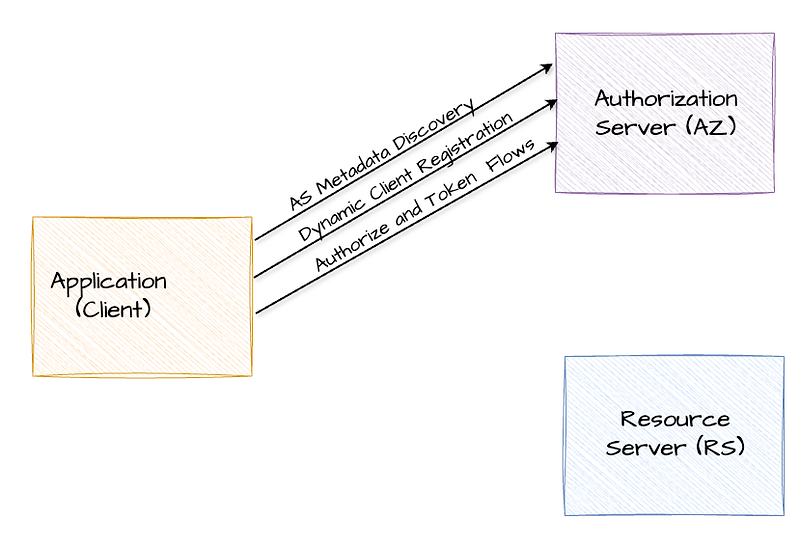
After obtaining an access token, the client presents it to the resource server to gain access. What’s important here is that, once the metadata endpoint is known, everything from metadata retrieval to registration and token handling can be automated at runtime, without manual intervention or hardcoded configurations. This brings us to a key question: how does the client know which metadata endpoint to contact in the first place? We’ll come back to that.
Interactions between Resource Server and Authorization Server
When the resource server receives an access token from a client, it must validate it. This validation process differs depending on the token type:
- Opaque (by-reference) tokens: validated using the token introspection endpoint, as defined by the OAuth2 Token Introspection specification.
- JWT (by-value) tokens: validated by verifying the token’s signature using public keys retrieved from the JWKS (JSON Web Key Set) endpoint.

Both introspection and JWKS-based validation can be fully automated, allowing the resource server to validate tokens at runtime without manual setup.
Now back to our earlier question — how does a client learn which authorization server protects a given resource?
Traditionally, developers rely on documentation — such as wikis or OpenAPI specs — to determine the security requirements of a protected resource. This includes learning which authorization server to use and where to find its metadata.
That approach has worked so far. But modern applications — like AI agents needing to dynamically access third-party tools through protocols like MCP — demand full automation. They need to discover all necessary information at runtime, without hardcoded configurations for dynamic integration.
Protected Resource Metadata (PRM)
This is the challenge addressed by the OAuth 2.0 Protected Resource Metadata (PRM) specification, which recently became a standard. Though the first draft appeared in 2016, it only recently became a priority due to emerging use cases. One of the spec’s authors reflected the same in his blog post. Protected Resource Metadata (PRM) is a mechanism that allows a protected resource — typically an API — to publish a machine-readable JSON document detailing its authorization requirements. This document specifies which OAuth authorization servers the resource trusts, the expected token formats and how to send them, the scopes clients must request to access it, and any additional security requirements such as use of sender-constrained tokens such as DPoP and certificate-bound tokens.
OAuth 2.0 Protected Resource Metadata (PRM) specification also completes the interactions between among OAuth 2.0 roles by adding the missing piece, alongside the Authorization Server Metadata and Dynamic Client Registration specifications providing full dynamic integration for client applications.
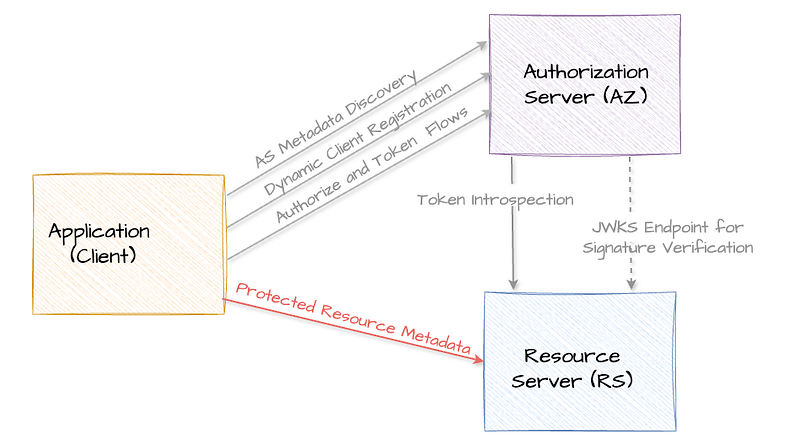
How PRM Works
When a client tries to access a protected resource without any secuity details , the resource server responds with an HTTP 401 Unauthorized as usual. In a PRM-compliant resource server, this response includes a WWW-Authenticate header with a resource_metadata field that points to the resource metadata URL. This is shown in the following diagram.

A sample HTTP 401 Unauthorized response message is also given below.
HTTP/1.1 401 Unauthorized
WWW-Authenticate: Bearer resource_metadata=“https://resource.example.com/**.well-known/oauth-protected-resource**”
Once the client application receives this response, it can make a Protected Resource Metadata Request — this is nothing but a simple HTTP GET — to fetch the resource metadata.
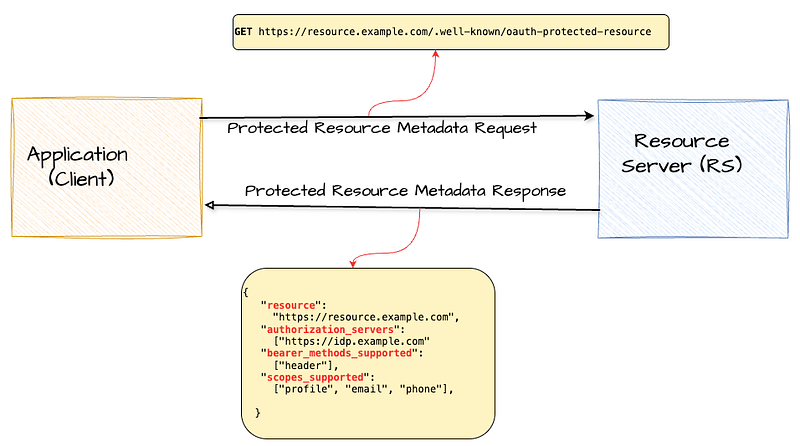
In the above example, the PRM response contains the authorization server issuer identifier which can be used to construct the metadata endpoint of the authorization server along with the scopes that the client has to request to acces the the specific resource. Additionally, it also indicate that the clioent should only send the bearer token as HTTP header. This process of deriving the authorization server metadata URL form the authorization server issuer identifier field of the protected resource metadata is shown in the following diagram.
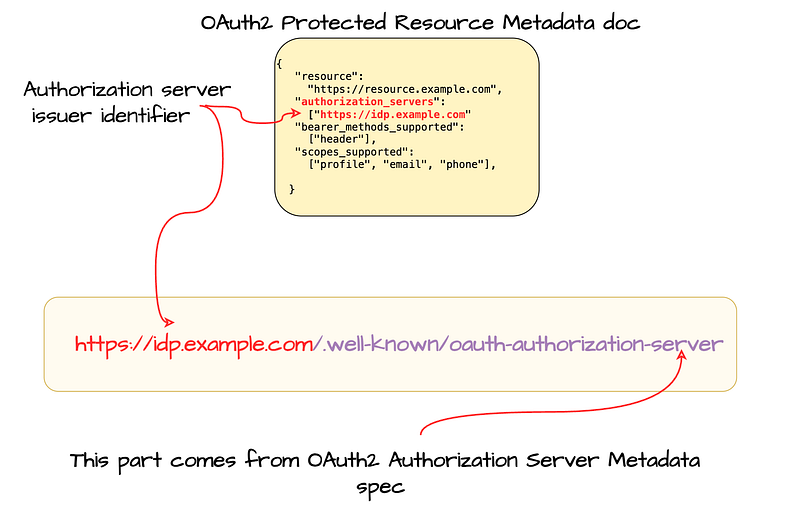
One important processing instruction to highlight here is that, at any given time, a resource can return a WWW-Authenticate challenge to indicate that the resource metadata has changed. In such scenarios, the client application should fetch the new resource server metadata and reflect the changes at the resource server. This allows the client application to update changes from the resource server in a consistent and automated fashio
Below are the key metadata parameters defined by the OAuth 2.0 Protected Resource Metadata specification:
**resource**— This is the only mandatory parameter and represent the unique identifier of the protected resource. The resource identifier is defined as a URL that points to the protected resource. It must use HTTPS and should not include a fragment. Ideally, it shouldn’t have a query string either.**authorization_servers**— A list of authorization server issuer identifiers that can be used with this resource. Note that as per the specification this is an optional parameter.**scopes_supported**— A list of supported OAuth 2.0 scopes that clients can request to access this resource. It is recommended to use this parameter.**bearer_methods_supported**— This indicates which methods are supported for passing access tokens to the resource. Valid values are"header","body", and"query". An empty array ([]) means no bearer methods are supported.**jwks_uri**— URL pointing to the JSON Web Key Set (JWKS) of the resource. This includes public keys used for signing or encrypting responses. The URL must use HTTPS.**resource_signing_alg_values_supported**— Lists the JWS signing algorithms supported by the resource when signing its responses. The valuenonemust not be used.**authorization_details_types_supported**— Lists the types ofauthorization_detailssupported by the resource when that parameter is used in requests.
The following human readable parameters are also defined but optional:
**resource_name**— A human-readable name of the resource, intended for display to the end user and should supports internationalization.**resource_documentation**(optional)
URL to human-readable documentation about the resource—useful for developers. Supports internationalization.**resource_policy_uri**(optional)
URL describing any policy restrictions or usage requirements associated with the resource. Supports internationalization.**resource_tos_uri**(optional)
URL pointing to the resource’s terms of service. Supports internationalization.
In addition to that following parameters are defined to be used with certificate-bound tokens that we discussed in a previous post and DPoP-bound tokens.
For certificate-bound tokens:
**tls_client_certificate_bound_access_tokens**— A boolean indicating whether the resource supports mutual-TLS client certificate-bound access tokens. Defaults tofalseif omitted.
mTLS and OAuth2 — Certificate-Bound Tokens
_In the previous post, we discussed the certificate-based mutual authentication process that takes place during the TLS…_sagarag.medium.com
For DPoP-bound tokens tokens:
**dpop_bound_access_tokens_required**— A boolean indicating whether the resource requires all access tokens to be DPoP-bound. Defaults tofalseif not specified.**dpop_signing_alg_values_supported**— Lists the supported JWS algorithms for validating DPoP proofs.
The Human-readable metadata values can be provided in multiple languages using language tags (like #en or #it) to support localization, and it’s recommended to also include a default version without a tag for broader compatibility.
In addition to regular JSON elements, metadata about a protected resource can be provided as a signed JWT , which contains the same metadata values in a bundled, cryptographically signed format. This JWT must be signed or MACed using JSON Web Signature (JWS) and must include an #iss (issuer) claim to identify who is asserting the metadata. While systems that don’t support signed metadata can ignore it, those that do must treat the signed values as authoritative over the plain JSON value. The signed metadata can be included in the resource meta suing the signed_metadata parameter.
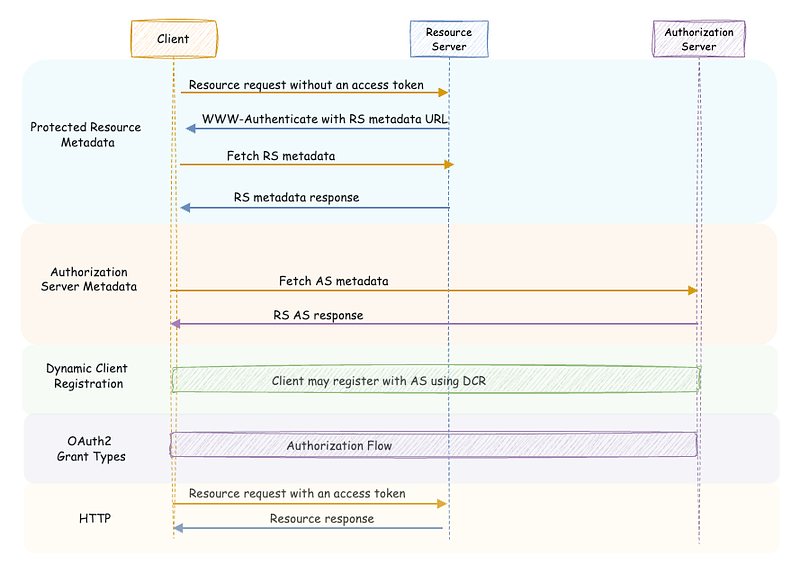
The following sequence diagram illustrates the end-to-end resource access flow along with the relevant standards. While the PAM specification highlights Dynamic Client Registration (DCR) as a possible approach for client registration, it does not mandate its use. However, DCR is included in this diagram to provide a complete picture of the flow and to emphasize how it enables full automation of the process.
Authorization Server Metadata
In addition to defining the above discussed, resource server metadata PRM specification define a new authorization server metadata called protected_resources . This parameter can be used by an Authorization Server metadata document to include a set of resources protected by the authorization server. This parameter facilitate the crosschecking of authorization server metadata and protected resource metadata.
In summary, the OAuth 2.0 Protected Resource Metadata specification fills a critical gap in the dynamic integration story of OAuth 2.0. By enabling clients to discover protected resource details at runtime, it eliminates reliance on static configuration and documentation. Combined with Authorization Server Metadata and Dynamic Client Registration, PRM supports fully automated, interoperable flows across OAuth 2.0 roles — laying the foundation for scalable and adaptable authorization in modern applications.
How do you discover the OAuth2 server configuration?
_This is the 2nd post of my blog series about the OAuth2; reading the first post may help you to understand this current…_sagarag.medium.com
How to register and manage OAuth2 clients?
_In the first post of this blog series about the OAuth2, I provided a comprehensive overview of the OAuth2 core…_sagarag.medium.com
mTLS and OAuth2 — Certificate-Bound Tokens
_In the previous post, we discussed the certificate-based mutual authentication process that takes place during the TLS…_sagarag.medium.com