In the previous post, we discussed the certificate-based mutual authentication process that takes place during the TLS handshake, and how that same mechanism can be leveraged for OAuth2 client authentication — a more secure approach, especially in scenarios where mTLS is already in use.
In this post, we’ll explore how certificates can be used to restrict the use of a token, such as an access token, so that only the intended party can use it. This helps prevent misuse — even if someone else gains access to the token, they won’t be able to use it without the corresponding certificate.
mTLS and OAuth2 — Client Authentication
_Whenever we hit a website or web application, we simply trust the browser to verify its authenticity and establish a…_sagarag.medium.com
Let’s start our discussion by reviewing the OAuth2 token types.
Chapter 1— OAuth2 Token Types
Tokens can be categorized based on several criteria, but for the scope of this post, we’ll focus on two key aspects: the format of the token and how the token is intended to be used.
Starting with the token format, there are two main types: reference-type and v_alue-type_ tokens.
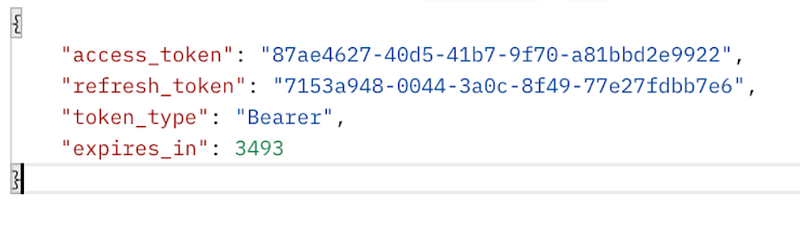
In reference-type tokens, the actual authorization details — such as the permissions granted by the end user — are stored exclusively on the authorization server. Instead of receiving the full content, the client is issued a reference value, which is why these are commonly called opaque tokens — the client has no visibility into what’s inside. This provides a security advantage — in the event of token exposure, no meaningful information can be extracted from the token since it contains no encoded data. It’s just a reference, not a payload.
When the client or resource server needs to retrieve the actual authorization data, they can present this opaque token to the introspection endpoint of the authorization server. Typically, these tokens are randomly generated strings with no embedded information.
While opaque tokens were more common in the early days of OAuth2, they’re still actively used in many systems today — especially in scenarios where token confidentiality is prioritized.
A sample authorization response with a reference token is given below.
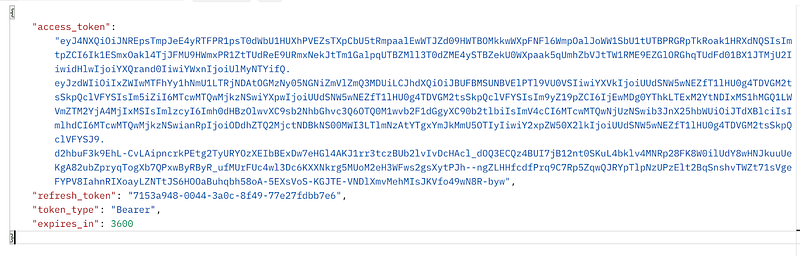
In contrast to reference-type (opaque) tokens, value-type tokens contain the authorization details and token metadata embedded directly within the token itself. One of the most widely adopted formats for value-type tokens is the JSON Web Token (JWT).
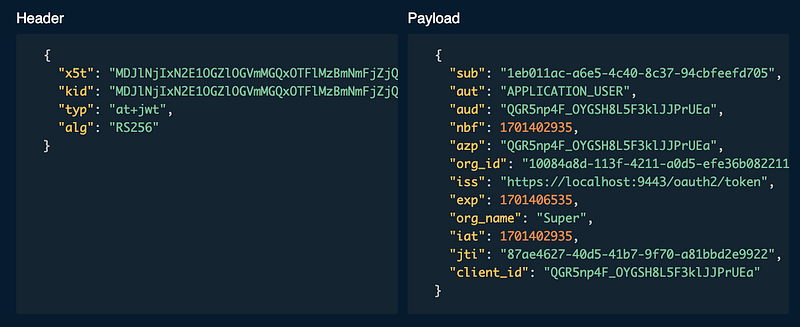
With JWTs, the authorization granted by the end user — as well as additional metadata — is represented in a JSON-encoded format. This allows the client or resource server to validate and extract token information locally, without needing to reach out to the authorization server. That’s a key reason why JWTs are often seen as more efficient and flexible compared to opaque tokens.
It’s important to understand that, in the context of OAuth2, JWT is an abstract format. You won’t typically encounter plain, unsigned JWTs in real-world scenarios. Instead, you’ll see:
- JWS (JSON Web Signature) — JWTs that are digitally signed by the token issuer
- JWE (JSON Web Encryption) — JWTs that are encrypted by the token issuer
The following diagram shows you an authorization response with a JWT access token.
If you decode the above JWT token, you would be able to see a JWT claim set similar to below.
Moving on to our next token categorization criteria, let’s now classify tokens based on how they’re intended to be used — specifically in the context of how a client presents the token when accessing a protected resource on a resource server. Once again, we have two primary types:
- Bearer tokens
- Proof-of-Possession (PoP) tokens (also known as sender-constrained tokens)
These two types can be best understood through a real-world analogy, illustrated in the following diagram.
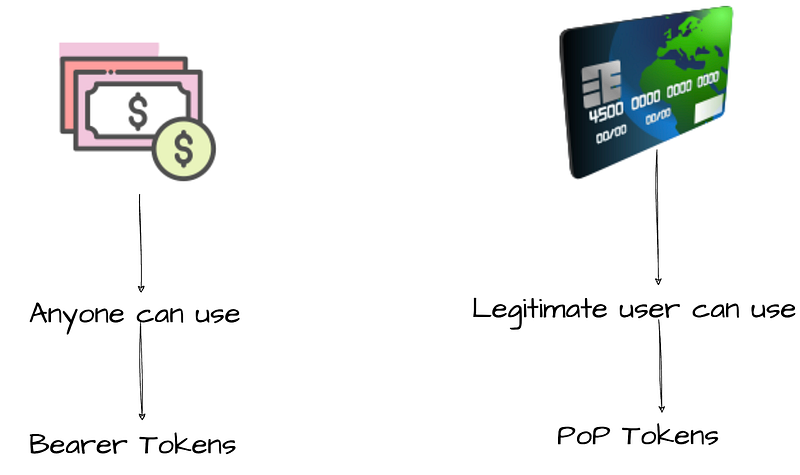
To understand the difference between bearer tokens and proof-of-possession (PoP) tokens, let’s use a simple real-world analogy — cash notes vs. credit cards. While cash notes may be less common these days, the comparison still helps illustrate the core concept.
When you walk into a shop and pay with cash, the merchant doesn’t verify your identity or whether the cash actually belongs to you. They may check if the note is authentic, but not who’s handing it over. You could have found that note on the street — and as long as you possess it, you’re allowed to use it. This is exactly how bearer tokens work. When a client presents a bearer token to a resource server, the server might validate the token itself, but not the party presenting it. Bearer tokens are widely adopted today due to their simplicity — you typically pass them as an HTTP header, and that’s it.
Now, consider paying with a credit card. In this case, the merchant often asks for a signature, and may even compare it with the one on the card. In some cases, your identity might be verified against the printed name. That’s how PoP tokens behave. Simply presenting the token isn’t enough — the client must prove it legitimately possesses what the token represents. The authorization server ensures this by binding the token to something the client can prove ownership of. Unlike bearer tokens, a client can’t just use someone else’s PoP token, because it won’t be able to demonstrate ownership.
PoP tokens offer a much stronger security posture than bearer tokens — but they’re not as commonly used just yet, mostly due to the additional complexity in implementation.
Chapter 2— Certificate-bound Tokens
We just discussed that Proof-of-Possession (PoP) tokens provide a stronger level of security than bearer tokens, as they require the client to present additional evidence proving it’s the legitimate party authorized to use the token.
If you recall from the previous post, we explored how during the mutual TLS (mTLS) handshake, a client proves possession of its private key by sending the CertificateVerify message along with its certificate. That verification step is already a built-in proof of possession mechanism.
mTLS and OAuth2 — Client Authentication
_Whenever we hit a website or web application, we simply trust the browser to verify its authenticity and establish a…_sagarag.medium.com
So here’s the interesting part: when an OAuth2 client establishes an mTLS connection with the authorization server, it has already demonstrated ownership of its private key. Can we use this same concept to create a new type of token binding mechanism?
That’s exactly what the second part of the OAuth 2.0 Mutual-TLS Client Authentication and Certificate-Bound Access Tokens specification enables — by introducing a new concept called Certificate-Bound Access Tokens.
At its core, a certificate-bound token is simply a token that the authorization server binds to the client certificate presented during the mTLS handshake. This means that in order to use the token, the client must establish an mTLS connection with the resource server using the exact same certificate. The resource server can then verify that the certificate associated with the token matches the one used in the current connection — ensuring the token is only usable by the rightful holder.
Now you might be wondering: how exactly is this binding achieved?
Instead of storing or transmitting the full certificate, the binding is typically done using the unique fingerprint of the certificate (as we discussed in the previous post). This fingerprint serves as a lightweight yet reliable way to link the token to its corresponding certificate, ensuring a secure and verifiable association between them.
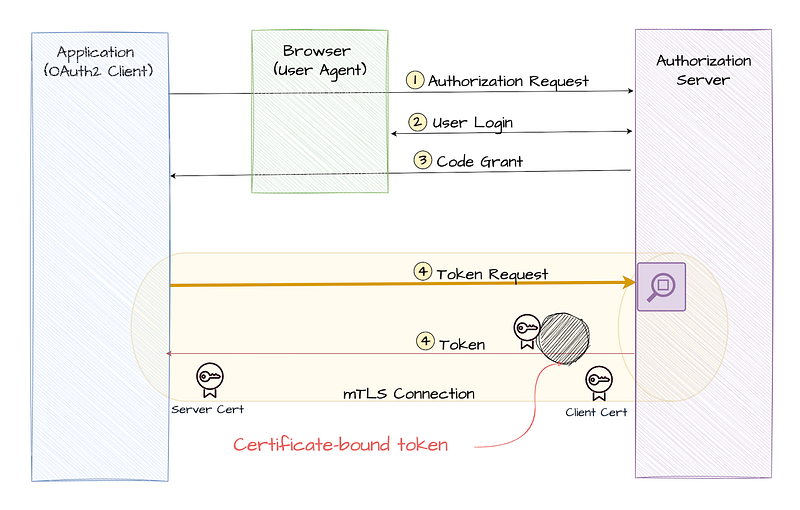
In the previous post we discussed how certificate fingerprint is calculated in detail. Jut for completeness, let’s revisit the process here:
- Convert the underlying certificate associated with mTLS into DER binary format.
- Calculate the hash value by applying the SHA-256 hash function to the DER binary data.
- Apply Base64 URL encoding to the resulting hash value.
These steps help generate the unique fingerprint that will be used to bind the certificate-bound access token to the specific client certificate.

Once the authorization server calculates the certificate fingerprint, it establishes a link with the token based on the token type.
- For opaque tokens, this association is maintained in the authorization server’s database. When needed, a resource server can retrieve the fingerprint by using the introspection endpoint.
- For JWT tokens, the fingerprint is included directly within the token. This eliminates the need for the resource server to contact the authorization server, allowing it to independently verify the token’s binding. To achieve this, the OAuth 2.0 Mutual-TLS Client Authentication and Certificate-Bound Access Tokens specification reuses the Confirmation Claim (cnf) from the Proof-of-Possession Key Semantics for JSON Web Tokens (JWTs) spec. It introduces a new JWT confirmation method member:
"x5t#s256", which represents the certificate’s fingerprint.
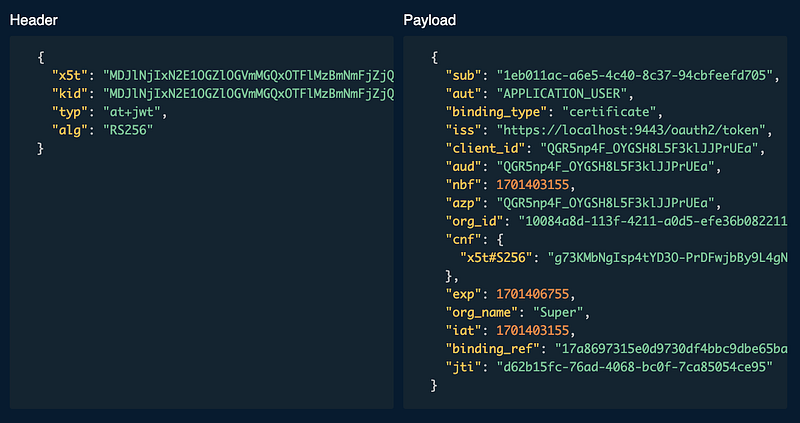
In simple terms, an authorization server can signal its support for certificate-bound tokens by adding the tls_client_certificate_bound_access_tokens parameter to its server metadata. When a client registers through the Dynamic Client Registration (DCR) endpoint, it can express its intention to use certificate-bound tokens by including this same parameter in its registration request. This allows the client and server to align on using mTLS for enhanced security with certificate-bound tokens.
Certificate-bound token validation at the resource server
From the resource server’s perspective, verifying a certificate-bound token involves ensuring that the client certificate used in the mTLS connection matches the certificate associated with the token. Here’s how the verification process works for both JWT and opaque tokens:
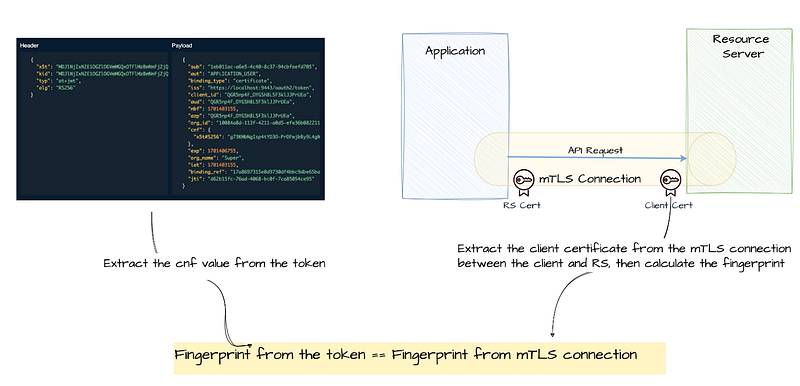
For JWT tokens: The resource server can verify the certificate bound to the JWT token by checking the **cnf** claim in the token. This claim contains the certificate’s fingerprint (using the **x5t#s256** method).
Steps for verification:
- Extract the fingerprint from the
cnfclaim in the JWT. - Obtain the certificate from the mTLS connection (i.e., the certificate used by the client).
- Calculate the fingerprint of the client’s certificate using the same hash algorithm (SHA-256) and Base64 URL encoding.
- Compare the calculated fingerprint with the one stored in the
cnfclaim. If they match, the client is authorized to access the resource. - If the fingerprints do not match, return an
invalid_tokenerror.
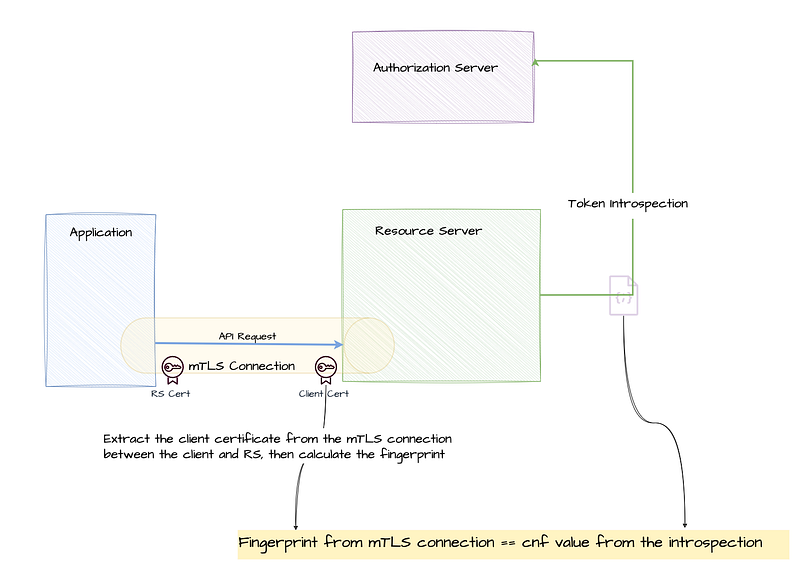
For opaque tokens: Opaque tokens do not carry embedded certificate information like JWT tokens. Instead, the resource server must call the introspection endpoint of the authorization server to validate the token and retrieve the associated certificate fingerprint.
Steps for verification:
- Call the introspection endpoint with the opaque token to retrieve metadata about the token.
- Check the certificate fingerprint retrieved from the introspection response.
- Obtain the certificate from the mTLS connection.
- Calculate the fingerprint of the client’s certificate.
- Compare the calculated fingerprint with the one received from the introspection response. If they match, the token is valid.
- If the fingerprints do not match, return an
invalid_tokenerror.
By ensuring that the certificate associated with the token is used during the mTLS handshake, both the client and resource server can confirm that the client presenting the token is indeed the rightful owner of the certificate and the associated access token. This strengthens security by preventing the misuse of tokens across different clients.
Chapter 3— Certificate-bound tokens and public clients
When an mTLS connection is established between an OAuth2 client and an authorization server, the verified certificate used during the initial handshake can serve as a client authentication method for confidential clients, such as server-side applications. This mechanism provides strong assurance of the client’s identity without relying on secrets or credentials passed over the network.
That said, while a public client can also establish an mTLS connection and complete the handshake, the authorization server should not authenticate it using mTLS — or any other client authentication method. Instead, public clients are typically handled using alternative mechanisms like Proof Key for Code Exchange (PKCE) , which are better suited for apps running in browsers or mobile environments.
Secure OAuth2: A Simple Story of Two Keys — PKCE
_This is the final post in my Secure OAuth2 blog series. I began this series by examining the security gaps in the…_sagarag.medium.com
Another important point to highlight, according to OAuth 2.0 Mutual-TLS Client Authentication and Certificate-Bound Access Tokens specification, the use of mTLS client authentication and certificate-bound tokens is independent — they do not require each other. For example:
- A client can authenticate using mTLS but still choose to use bearer tokens for simplicity.
- Conversely, a public client with no client authentication method can still use certificate-bound tokens, as long as it’s capable of establishing mTLS connections with both the authorization server and the resource server.
This flexibility is key to making mTLS a practical option across a wide range of OAuth2 deployment scenarios.
Continuing our discussion on how you can leverage mTLS for OAuth2, we took a closer look at how client certificates used in mTLS can be used to bind tokens to a client. We can ensure that only the intended party can use the token — even if it somehow falls into the wrong hands, it remains completely useless to anyone else. This approach not only raises the security bar but also brings a new level of trust and control.
I hope this post, along with the previous one, has shed some light on how to use mTLS in OAuth2. There’s plenty more to explore in this space, so stay tuned for the next post!
mTLS and OAuth2 — Client Authentication
_Whenever we hit a website or web application, we simply trust the browser to verify its authenticity and establish a…_sagarag.medium.com