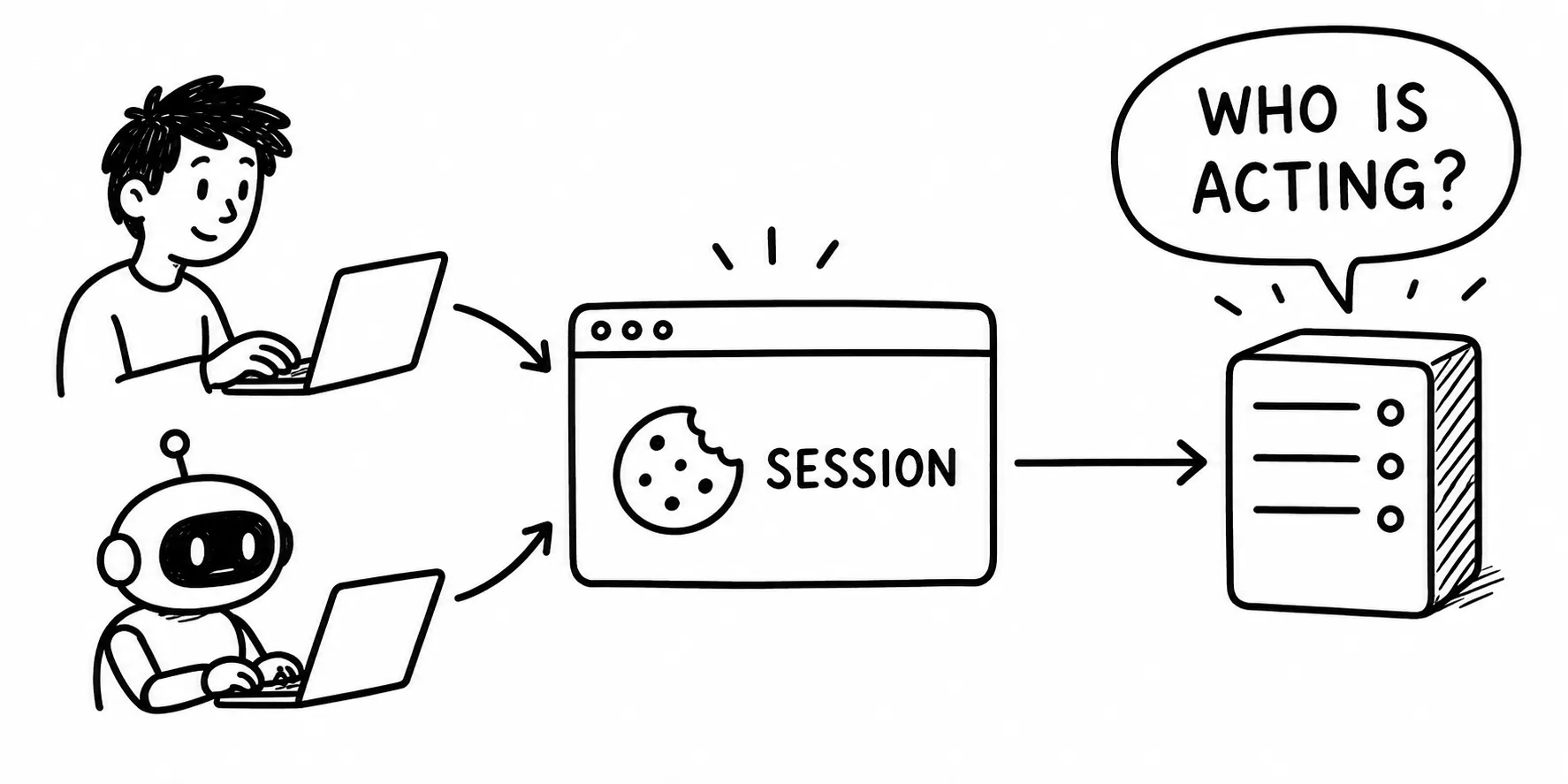
Imagine telling an AI: Review my active subscriptions and cancel the ones I’m not using. A browser-based agent can now do exactly that: access your email, identify monthly subscriptions, extract billing amounts and due dates, and, if you decide to cancel, navigate the provider’s app and complete it on your behalf. No integrations, no APIs, no special setup. Just your browser.
This is a significant shift from how most people have consumed AI capabilities. Conversational agents like ChatGPT were mostly limited to generating text. Coding agents like GitHub Copilot operate within specific domains and assist with well-defined tasks rather than end-to-end workflows. Browser-based agents are starting to break that boundary. They move beyond conversation and into execution, making decisions, navigating interfaces, and completing workflows the same way a human would.
But before treating this as a silver bullet, it’s worth looking at what’s actually happening under the hood. These agents act with your level of access. They operate across systems, make decisions, and execute actions on your behalf. That raises a few critical questions:
- What exactly can the agent access, and under whose identity?
- Where do the trust boundaries sit?
- Who is accountable for the actions taken, you or the agent?
The answers will determine whether browser-based agents become a practical productivity layer or a security liability.
How do they actually work?
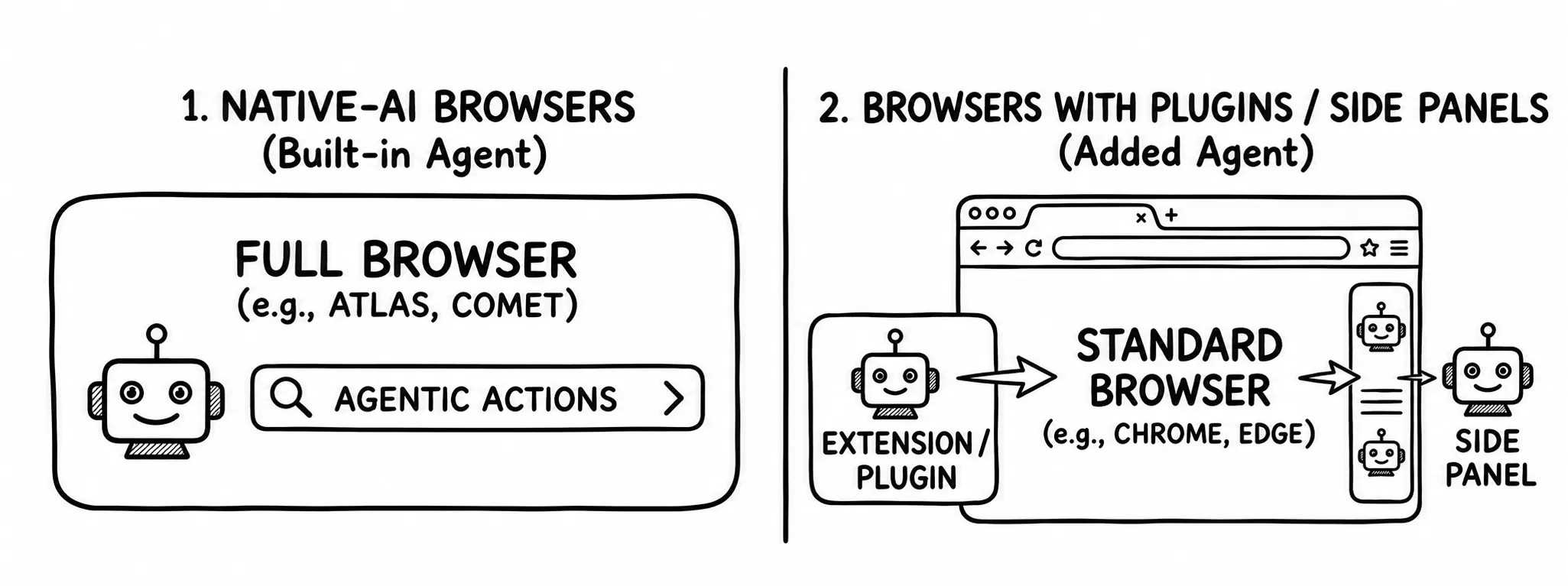
Browser-based agents typically fall into two categories: native AI browsers and browser extensions or side panels. Regardless of how they are built, under the hood they perform the same set of activities.
-
Native AI browsers, such as OpenAI Atlas and Perplexity Comet, have agentic capabilities built directly into the browser. These browsers were born in the agentic AI era.
-
Browser extensions and side panels are agents built on top of existing browsers using extension points or side panel APIs. Claude for Chrome is a good example, delivered as a Chrome extension.
The easiest way to understand this is to look at the runtime interactions between the components when executing a task like the subscription review we discussed earlier.
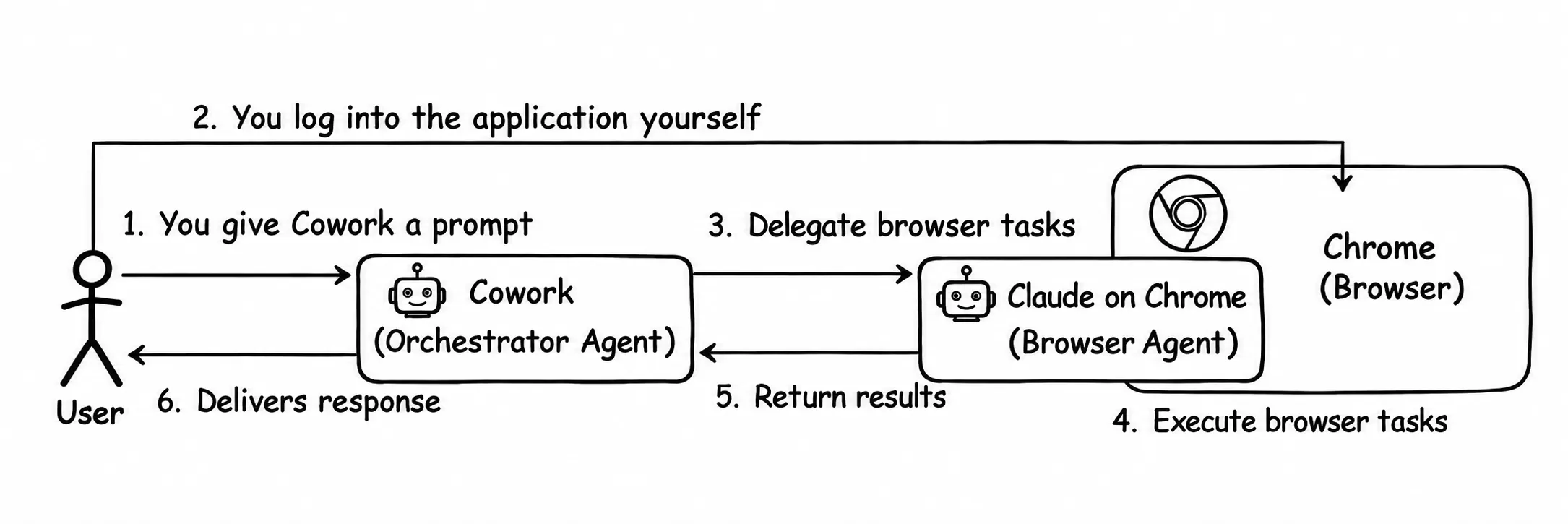
It starts with you, the user, providing a prompt to Cowork, which can be available in the Claude Desktop application, for example: Review my active subscriptions….
At this point, Cowork takes the lead as the orchestrator agent. It consults the LLM to interpret your intent and, instead of just guessing, builds a structured plan. This plan is a structured sequence of actions, such as List emails from the last 30 days, Identify billing domains, and Check account status for each.
Execution of this plan involves delegation. Cowork, as the orchestrator agent, assigns tasks that involve browser interactions to the browser agent (in this case, Claude running in Chrome). The browser agent is responsible for every interaction inside the browser: navigating to URLs, reading page content, clicking elements like menus and buttons, filling and submitting forms, and interacting with web applications.
One important point to keep in mind: at the start of a task, the browser agent directs you to the relevant application and pauses for you to log in with your own credentials, just as you normally would. Once authenticated, the agent inherits that session to carry out its delegated tasks.
As each step is completed, the browser agent reports the raw data back to Cowork. The orchestrator then iterates. It analyzes the data, refines the next steps in the plan, or issues new instructions back to the browser. Only once the entire multi-step plan is fully executed does Cowork synthesize the results and return the final outcome to you.
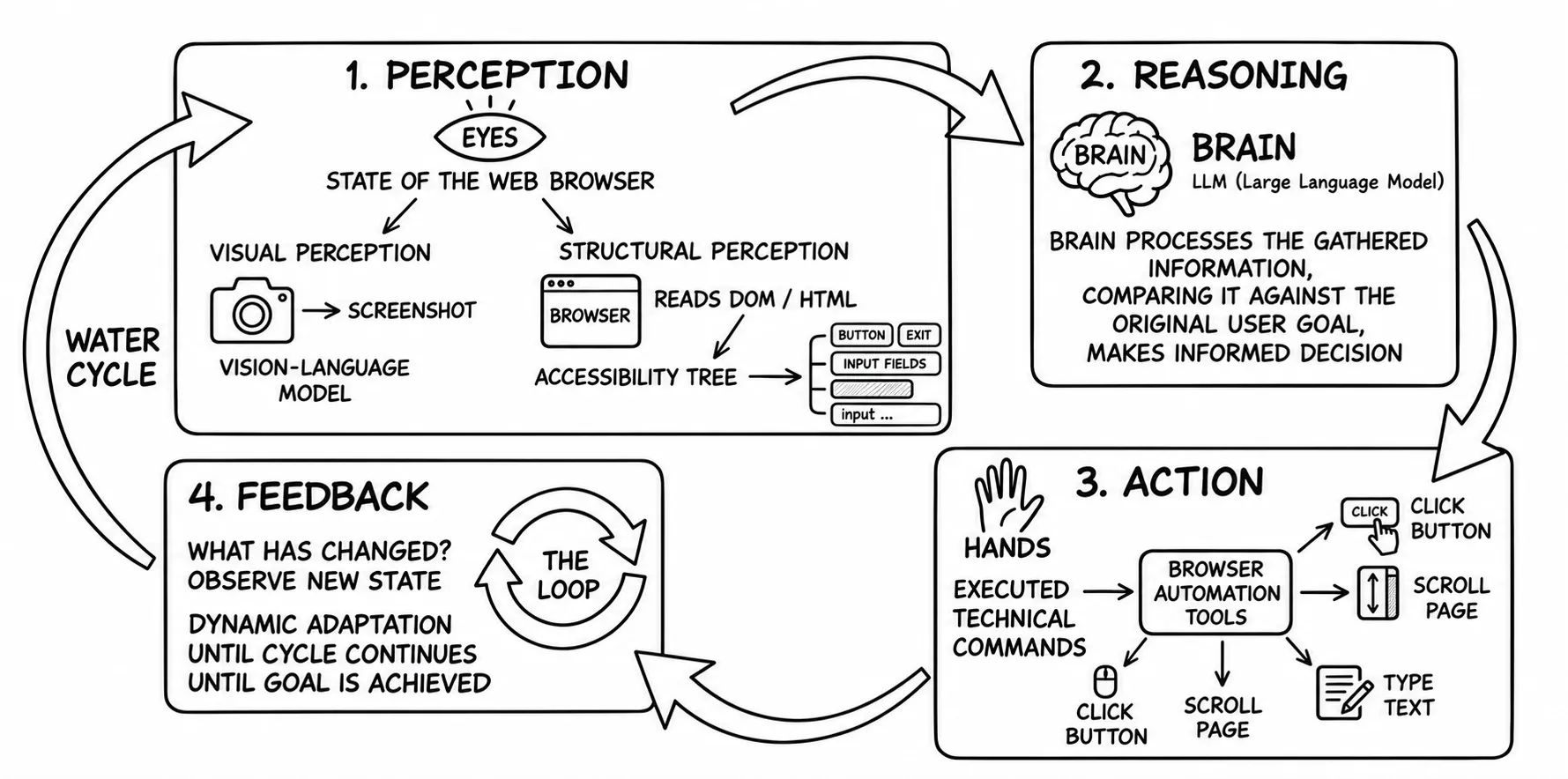
The most fascinating aspect of a browser agent is its ability to perform just like us, navigating to URLs, reading content, filling forms, and interacting with any web application, without any additional tools or credentials. And that is exactly where we need to focus. Now, let’s break down how this actually works under the hood, because the way a browser agent perceives and acts on a web page is more fascinating than it might seem. A browser agent gains these abilities by carrying out a perception-action loop, which breaks down into four distinct phases:
- Perception
- Reasoning
- Act
- Feedback
Perception
Just like a human would use eyes and ears as sensors, a browser agent needs sensors of its own to understand a web application. In the case of browser-based agents, that perception comes in two forms.
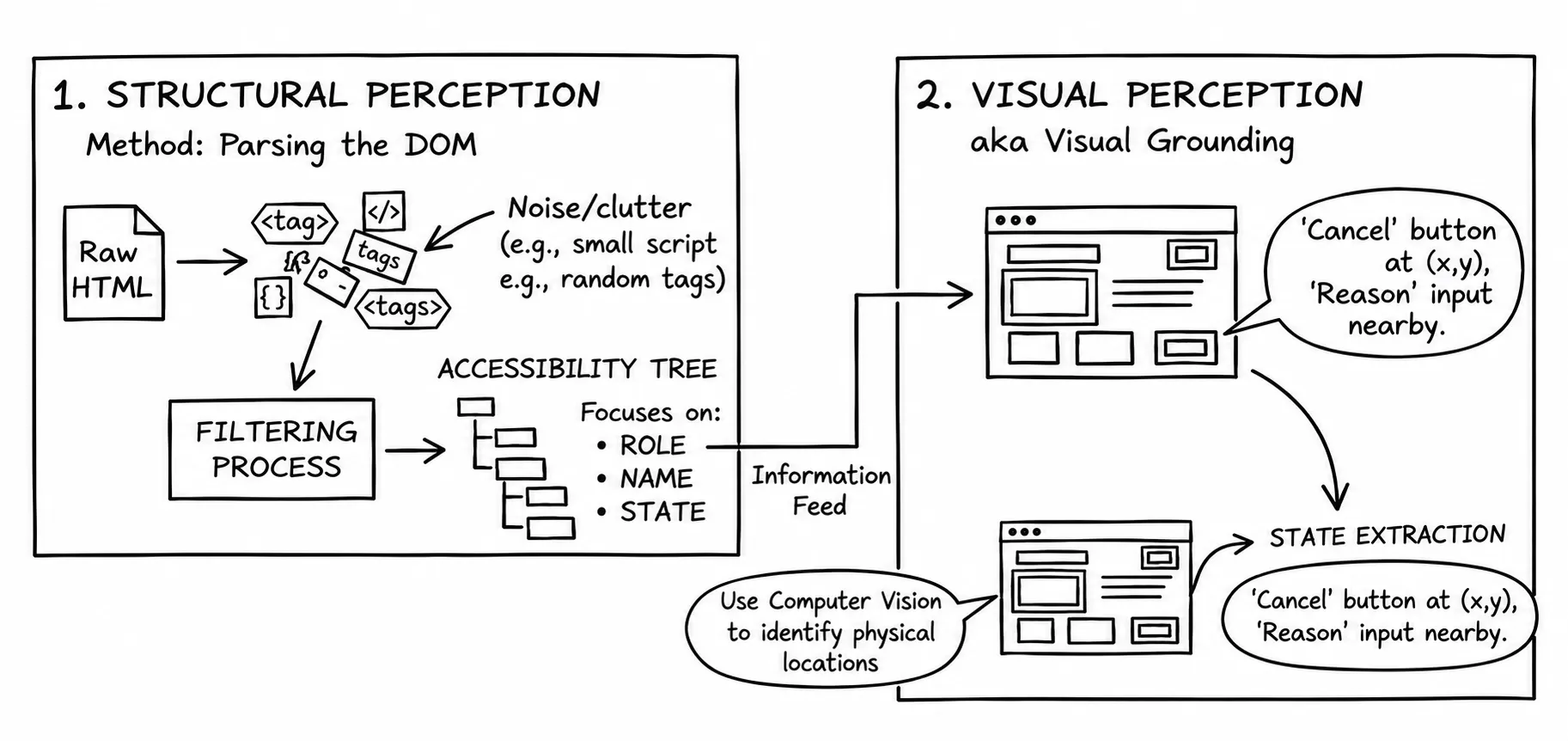
The first is structural perception. Here, the agent perceives a page by parsing the Document Object Model (DOM), which includes labels, buttons, inputs, links, and their attributes. However, raw HTML is often cluttered with tracking scripts, hidden divs, and metadata that are irrelevant to the task. To filter this noise, agents often generate an accessibility tree, a simplified version of the DOM designed for assistive technologies such as screen readers. It focuses on:
- Role: Is this a button, a link, or an input field?
- Name: What text is associated with this element?
- State: Is this checkbox checked? Is this button disabled?
Additionally, for text-heavy pages, the agent might extract the raw text content separately.
The second method is much closer to how humans work, and is called visual perception or visual grounding, where the agent takes actual screenshots. It uses computer vision to identify where a button physically sits on the screen, which is critical for modern, JavaScript-heavy sites where the HTML doesn’t always match the visual layout. Using this method, it performs state extraction, the process of identifying interactive elements: There is a ‘Cancel’ button at coordinate (x, y) and an input field labeled ‘Reason’ next to it.
Reasoning
Once the agent perceives the page, it enters the reasoning phase. This is where raw input is turned into decisions. Think of it as the agent’s internal logic controller.
The first step is task decomposition. A high-level goal like Audit user login frequency and session duration is broken down into smaller, actionable steps: navigate to the admin or security dashboard, locate activity logs, and identify timestamps for session start and end events.
This process is driven by chain-of-thought (CoT) reasoning. The agent works through intermediate steps internally to decide what to do next. For example: “I am on the dashboard. I see a ‘Security’ tab. I need to click it to find audit logs.” Each action is based on the current state of the interface.
At the same time, the agent performs constraint checking to reduce errors. It does not blindly extract data. Instead, it evaluates what it sees against the intended task. If it encounters a column labeled Last Password Change instead of Session Start, it recognizes the mismatch and continues searching for the correct data.
This ability to reason and self-correct is what separates an autonomous agent from a brittle, hard-coded scraper.
Act
Reasoning is not useful unless it translates into real browser actions. This is the act phase, where the agent moves from internal logic to execution.
At this stage, the agent interacts with a browser automation engine such as Playwright or Puppeteer for Chromium. It triggers concrete actions (clicks, typing, and hovers) on specific DOM elements or screen coordinates identified during the perception phase.
The agent also manages navigation. It can move across pages, follow links, issue direct URL navigations, or refresh the page when the state becomes inconsistent.
To operate reliably in real environments, agents need to behave less like scripts and more like users. This is where human mimicry comes in. The agent introduces realistic delays and non-linear mouse movements instead of executing actions at machine speed.
This is not just an optimization. Without it, agents are easily flagged by anti-bot systems. A fast, deterministic script gets blocked. An agent that behaves like a user is far more likely to complete the task.
Feedback
The final stage is feedback, where the agent pauses to evaluate the outcome of its actions. It starts with observation. The agent inspects the updated browser state: did a confirmation modal appear after a click, or did the page refresh without making progress? This step determines whether the previous action actually achieved its intended result.
That feeds directly into error handling. If the agent encounters signals like Access Denied or Data Not Found, it doesn’t fail immediately. The reasoning loop picks this up in the next cycle and adjusts the plan by retrying, taking an alternative path, or skipping a step.
The loop concludes with self-reflection. The agent compares the current state with the intended goal. If the goal is met, the task ends. If not, the agent continues by starting a new cycle with fresh perception of the updated UI. This continuous loop of observe, adjust, and retry is what makes the system resilient rather than brittle.
But here’s the catch: the same loop that makes these agents powerful also introduces real security and identity implications that aren’t obvious until you look closely.
Echoes of the pre-OAuth2 era
It starts at the perception phase. The browser agent asks you to log in to a web application using your own credentials. It doesn’t request or store those credentials. Instead, it relies on you to authenticate as usual and then takes over the session.
From that point on, the agent operates within your authenticated session. Access is technically limited to that session, but in reality, many applications maintain long-lived sessions, which extends the agent’s effective access window.
This starts to look familiar.
Before OAuth 2.0, third-party applications often asked users to share credentials directly. While the mechanics here are different (the agent never accesses or stores your password), the underlying implication is similar: impersonation. Another entity is now acting on your behalf, and the party that provides the service to you cannot distinguish between you and the agent.
That is exactly the class of problem OAuth 2.0 (RFC 6749) set out to solve. OAuth 2.0 introduced two key safeguards.
First, users no longer share credentials with third-party applications. Instead, those applications receive scoped, short-lived access tokens based on explicit user consent. Users also retain control: they can limit access via scopes and revoke tokens at any time.
Second, it relies on the concept of client identity (client_id). This allows the service-providing party to
distinguish between direct user access and access performed by an external application acting on behalf of the user (the client).
Going back to browser-based agents.
Today, these agents effectively operate by inheriting your identity. Because the browser-based agent unconditionally inherits your browser session, it can access your cookies, auth tokens, SSO state, and your roles and permissions. From the perspective of the service provider, every action appears as if it is performed by you. There is no distinction, no explicit delegation, and no visibility into the fact that an agent is involved.
None of this is hypothetical. Prompt injection attacks already demonstrate how handing over active sessions to agents can lead to unintended and potentially dangerous actions. Anthropic’s own testing of Claude in Chrome documents exactly this: scenarios where the agent could be manipulated into extracting and sharing sensitive information or deleting important files.
A decade ago, we were cautious about letting third-party software impersonate users, and about sharing one app’s password with relatively simple systems. But today we are handing our sessions to multiple apps, and to autonomous agents that can reason, adapt, and act non-deterministically, and that send screenshots to third-party cloud services.
Ideally, we should be able to:
- Maintain a separate audit trail for actions carried out by agents.
- Set a scoped permission set for an agent that is a subset of your permissions (e.g., the agent can read but not write).
- Limit the agent’s session time separately from the user session (e.g., the agent can access for 10 minutes).
- Revoke an agent’s access independently.
But without the notion of a unique identity for agents, none of the above is feasible. And that is the real issue: we have already solved this class of identity problem once, just not in this new context.
Remember screen scraping?
Those who used VNC and Citrix a couple of decades ago, streaming pixel buffers to give a remote human operator visual access to a machine, might find a lot of similarities to how browser-based agents perform visual perception today. The mechanism has changed, but the underlying model has not: an entity other than you is watching your screen and acting on what it sees.
Browser agents perform visual perception by taking event-driven screenshots of the browser window and uploading them as base64 images to the LLM, which is, in most cases, a cloud service. The reasoning process that follows, analyzing page content, accessibility trees, screenshots, and the full conversation history, all happens remotely. In other words, your browser windows are being streamed to a third-party server to be interpreted.
The first time this really hit me was when I tried out a Claude skill that needed access to a couple of cloud services. After logging in, I watched the agent navigate the interfaces, and that’s when it clicked: the screenshots of my browser windows were being sent to a remote server to be reasoned about.
You can opt out of having your data used for training, but once that data leaves your browser, you are no longer in control. A data breach at the server used to temporarily store these images carries serious implications. The page data can contain session tokens, cookies, and other internal application state. Ideally, screenshots and page content should never leave your local environment. Beyond that boundary, you are entirely dependent on your AI provider’s policies and safeguard mechanisms.
Access control: full browser API, no identity boundaries
To dig further into the act phase, browser-based agents fundamentally use a combination of two approaches.
Visual coordinate-based: the agent clicks by pixel coordinates based on visual perception achieved using screenshots.
Structural DOM-based: the agent clicks by element references based on the accessibility tree built using structural perception.
When an agent decides to act, it reaches for a browser automation API like the Chrome DevTools Protocol (CDP), a low-level protocol built into Chromium that Playwright and Puppeteer also rely on. Look at what CDP alone exposes: navigating to URLs, clicking elements, typing text, executing arbitrary JavaScript, reading the DOM, capturing screenshots, intercepting network calls, and reaching into logs, cookies, and storage. That is effectively the entire browser. Now notice what is not on that list: any notion of who is wielding it.
The Chrome Extension API is similar, and is used when the browser agent is developed as a browser extension. There are other methods like JavaScript injection and simulated input events, but the bottom line is the same: browser-based agents gain full access to the page context, network, and storage.
Unlike deterministic browser extensions, which are quite simple, performing one task and shipping to the extension stores via a review process, an autonomous, non-deterministic agent with full control over the browser API is obviously too much risk to take.
Guardrails improve browser-based agent security, but don’t fix the identity gap
Like any other agent, browser-based agents have multiple layers of guardrails in place; they don’t have full freedom to do whatever they want.
First, there are category restrictions, such as domain-level controls that decide whether the agent can access a specific domain. For instance, in the case of Claude, financial, adult, and crypto sites are not allowed, the full blocklist also covers investment and trading platforms and known pirated-content sites.
Then there are guardrails to defend against prompt injection attacks. For instance, the content isolation rule makes sure the agent follows instructions coming from the user via the chat and ignores any instructions found in the page content. Other approaches, like a classifier model, flag suspicious patterns in page content before they reach the LLM.
Then there are action permission gates, where the user can define what actions can be performed and when, based on action type. For instance, the agent always asks the user explicitly whenever it tries to purchase or delete something.
Most importantly, the agent performs an irreversibility check. If an action is irreversible, the agent has to stop execution and get explicit confirmation before proceeding.
These guardrails do an excellent job: preventing obvious runaway behaviors, giving the user visibility and control, protecting against prompt injection, and adding safeguards around high-risk activities. But they are not able to address the identity, access control, and security implications of visual grounding via screenshots. So guardrails are absolutely required, but they are not adequate.
What about MCP?
If we go to first principles and ask why browser agents use structural and visual perception, it’s because there is no universally common API exposed by all web applications. On the other hand, web pages rendered as HTML are universally common for any human to access. So for now, agents like Claude Cowork are restricted to using the interface that the web application exposes for humans, and have to implement complex processes like building accessibility trees and visual grounding. There are RESTful and other types of APIs exposed by web applications, but there is no common standard among them, so it’s not practical for AI agents to build proprietary integrations for every API imaginable.
Isn’t MCP designed for this problem? That’s exactly what it’s designed to do. The design goal of MCP is to provide a universal integration protocol that bridges LLM-based applications such as AI agents with real-world data and services. MCP promises to eliminate the need for an AI agent to adopt web interfaces designed for humans. Instead, agents can learn the available capabilities and resources, then retrieve resources and consume capabilities via the MCP interface.
This drastically reduces today’s complexity and solves most of the security implications. Users no longer need to share their sessions. Instead, the same OAuth 2.0-based short-lived tokens we’ve been using with web APIs apply here too, and OAuth 2.0 scopes, along with other access control policies, can control the level of access.
The MCP authorization spec is also mature enough now compared to last year, and has gradually stabilized.
So why did Anthropic develop Claude in Chrome when MCP, which also originated at Anthropic, is designed for exactly this problem? This is not because MCP is a bad technology. Rather, MCP is not yet widely deployed in production, and with ongoing AI competition, Anthropic can’t wait for MCP to find momentum. They are forced to find a solution that works with current mainstream technology.
One reason organizations hold back from production-grade MCP servers is simple: it’s another system to build and own. Like any API, an MCP server has to be designed, governed, secured, and run on real infrastructure.
For teams that already have mature REST or GraphQL APIs, the cost is incremental. They can add an MCP gateway and reuse the OAuth 2.0 identity infrastructure they already run. But for most small organizations, especially end-user-facing ones, a web application with pages is already enough. Asking them to stand up and maintain a parallel system just to serve agents is a hard sell.
Although it would be a good idea to have two different interfaces for humans and machines, that shouldn’t require building and maintaining two parallel systems. We need a better solution. On top of that, the MCP development workflow is, as of now, distant from some web application developers and their workflows.
This is exactly where WebMCP gets interesting, by making MCP more accessible for web developers and making it much more affordable and maintainable to provide MCP server capabilities alongside the human-oriented web interface.
WebMCP: purpose-built agent interfaces for the web
If the main goal of MCP is to provide universal pluggability for LLM-based applications, the proposed WebMCP tries to make it part of a standard browser API, much more approachable for web application developers, and, most importantly, available via a standard browser context for browser-based agents.
With WebMCP, a web developer can define a set of MCP tool declarations
for the current page by calling the modelContext.registerTool() method in JavaScript. This method accepts metadata
describing the underlying tool, along with a callback function that is executed when the tool is invoked.
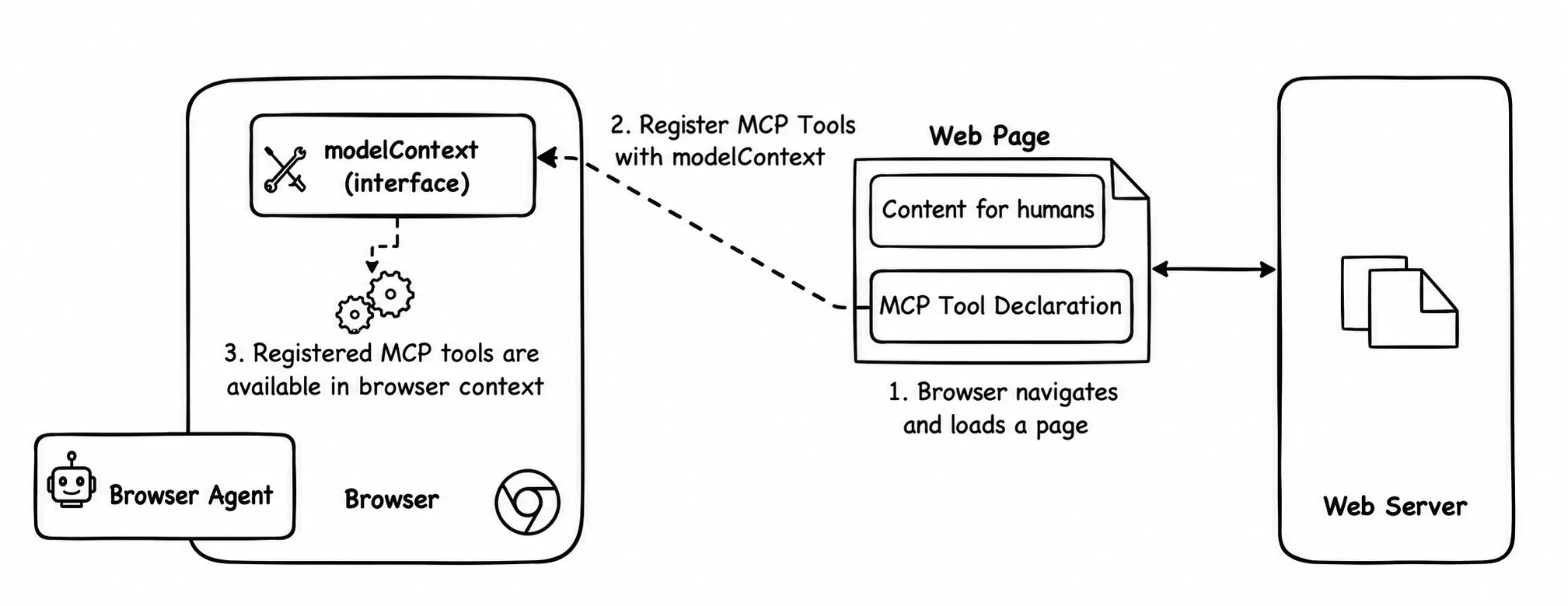
As shown in the example below, this is a straightforward addition for most web developers.
const weatherTool = navigator.modelContext.registerTool({
  name: "weather",
  description: "Get weather information for a location",
  inputSchema: { type: "object", properties: { location: { type: "string" } } },
  async execute({ location }) {
    return {
      content: [{ type: "text", text: `Weather for ${location}: ${weather} }]
    };
  }
});
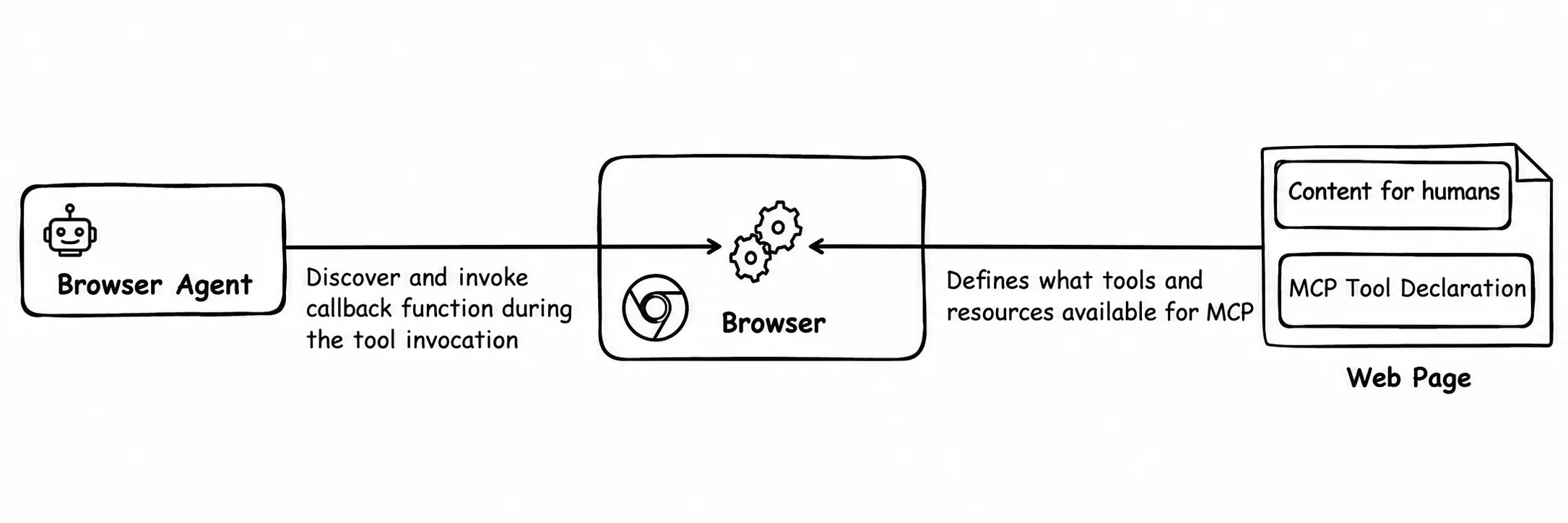
When a browser navigates to a web page that includes WebMCP declarations, it automatically registers these tools within a higher-level browser context (e.g., the tab context). A browser-based agent can then discover and invoke these MCP tools through that context, similar to standard MCP tool invocation, which in turn executes the associated JavaScript callback functions.
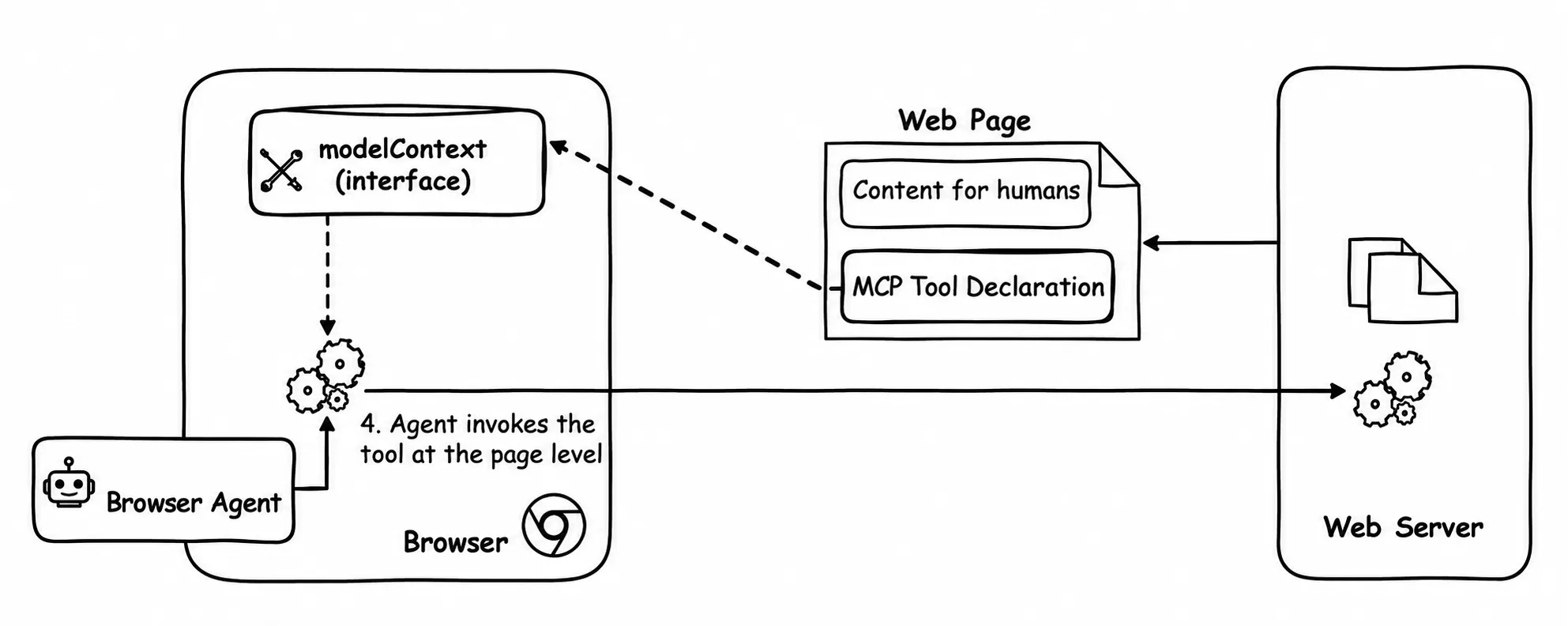
These callback functions can run on the main thread or be delegated to a worker. They may return results synchronously or return a Promise that resolves asynchronously. In relation to our discussion, WebMCP solves several problems:
-
Clean, agent-specific interfaces. WebMCP lets developers define a clear, purpose-built interface for agents that is separate from the human-facing UI. Using familiar JavaScript, developers expose functionality through tool declarations and callbacks directly within the same web page. This gives developers full control over what capabilities and resources are exposed to agents, how they are exposed, what inputs are expected, and what outputs are returned, all in a concise, well-defined interface. It reinforces a design principle of separating interfaces for humans and agents.
-
Eliminating reliance on DOM interpretation. Browser-based agents no longer need to rely on the DOM, an interface designed primarily for humans, to build accessibility trees or perform expensive LLM-based reasoning to infer available functionality. Instead, agents can directly discover capabilities through the browser context as structured MCP tools, with explicit definitions of inputs, outputs, and intent.
-
Direct and efficient tool execution. Once discovered, agents can execute tools directly via the browser context. For example, a browser-based agent implemented as a Chrome extension can use underlying browser APIs to invoke registered tools, which in turn execute the corresponding JavaScript callbacks defined by the page. This removes the need for fragile browser automation techniques such as simulating user interactions or relying on screenshots to determine application state. Instead, agents interact with purpose-built, reliable interfaces designed specifically for them.
While WebMCP introduces a few additional steps to the developer workflow and may increase infrastructure requirements, this is more of an extension of existing systems rather than the need to build and maintain a completely separate system solely for MCP.
If you want to explore this hands-on, I recommend trying out the WebMCP Playground project or MCP-B with a sample application.
Standardizing WebMCP is a significant step in the right direction. However, there are still open questions, particularly around identity and authorization.
In practice, most JavaScript callback functions behind MCP tools need to either retrieve or modify state via backend APIs. These APIs are typically protected, and for good reason, they obviously cannot be publicly exposed. As a result, browser-based agents often rely on the logged-in user’s session or access tokens to perform these operations, effectively introducing another layer of impersonation.
While requests originating from MCP tools can be distinguished from direct user actions, the lack of a distinct agent identity remains a key limitation. Without a unique identity, agents cannot properly identify themselves to backend systems.
There are emerging approaches to address this. The OpenID Foundation’s Identity Management for Agentic AI whitepaper, published in late 2025, is one industry effort mapping out exactly this gap. On the mechanics, OAuth 2.0 token exchange (RFC 8693) and related specifications can enable issuing separate tokens for agents. However, this still assumes that the agent has its own identity to begin with.
Although browser-based agents typically obtain user consent before executing tools, backend systems still perceive these actions as being performed by the user. This makes it difficult to enforce access control policies specifically for agents. Consenting to an agent acting on your behalf is not the same as granting scoped, revocable, auditable delegation. OAuth 2.0 taught us exactly this distinction a decade ago: user consent alone is what the pre-OAuth2 world relied on too.
Given that WebMCP is still in an early stage, it will be interesting to see how the ecosystem evolves to address these challenges, whether through enhancements in authorization models or complementary specifications.
One practical challenge remains: not every application has OAuth 2.0 infrastructure in place. For smaller organizations, deploying and maintaining such infrastructure can be a barrier, which needs to be considered when designing future solutions in this space.
The browser agent identity problem: agents that borrow yours
The most fundamental limitation of current browser-based agents, also inherited by WebMCP, is the absence of a distinct identity for agents. Today, agents operate by impersonating the human user, effectively hijacking (with user consent) the user’s session to interact with web applications.
This model is fundamentally flawed.
As autonomous agents become more sophisticated, they must be treated as independent actors with their own identities. The assumption that user identity == agent identity, and user session == agent session, in the context of accessing business applications, is incorrect and needs to be addressed early.
This isn’t a new idea. We decided years ago that non-human actors deserve their own identities. Workloads and services already get their own credentials through models like SPIFFE and service accounts, precisely so we can authorize and audit them separately from the people who run them. We have gone even further with workload identity federation, which gives us an even more secure execution model. Agents are simply the next class of non-human actor, and they deserve the same treatment. But fundamentally, agents are not as dumb as traditional workloads. They reason, adapt, and act, which puts them somewhere closer to humans, and that makes a distinct identity for them even more important.
To be clear, MCP is an API interaction model. It is not responsible for defining identity. Its role is to standardize how tools are invoked and how authorization is applied at the protocol level. The current MCP authorization model provides a solid baseline for enforcing access control during tool invocation.
However, the question of who or what is invoking those tools, human or agent, must be handled at the identity layer, outside of MCP.
The internet was built without a native identity layer, and we continue to deal with the consequences of that decision. We cannot afford to repeat the same mistake when building the agentic web.
An agentic ecosystem without a clear notion of identity will lead to ambiguity in accountability, weak access control, and increased security risks. Establishing a proper identity model for agents is not optional. It is foundational.
If you see this differently, I’d genuinely like to know, especially if you’re solving this in production. Find me on LinkedIn; I’d love to continue the conversation there.