As leading financial platforms like PayPal, Stripe, and Visa roll out AI-driven features, it’s becoming increasingly clear that the AI wave is steadily reshaping a wide range of industries. At the core of this transformation lies the need for seamless integration between large language models (LLMs) and real-world business systems — a challenge the Model Context Protocol (MCP) is designed to address.
In the previous post, I covered the basics of MCP through a hands-on example using the GitHub MCP server. The server was run locally and connected to VS Code — configured as the MCP host. For simplicity, communication between the server and client used STDIO as the transport layer, which relies on interprocess communication and doesn’t require explicit security handling.
In this post, I’ll extend that setup by connecting Claude Desktop to the remote MCP server hosted by PayPal. Since this setup uses HTTP for transport, it introduces the need to handle authentication using the MCP authrization specification. Unlike the previous developer-centric use case, this example reflects a more generalized scenario — one that could apply to any client interfacing with a financial service like PayPal over MCP. If you are not familiar about the basics of MCP, I would recommend to go through my previous post or refer any other basic article.
Unwrapping MCP : A Walkthrough with the GitHub MCP Server
_We started to see the popping up of MCP servers from various organizations — from tools used in software development…_sagarag.medium.com
NOTE — this blog post is based on 2025–03–26 revision of the MCP protocol and changes introduced to the auth spec on 2025–04–26.
This post focuses specifically on PayPal’s remote MCP server, which is hosted on PayPal’s infrastructure and communicates with clients using HTTP/SSE transports. For context, PayPal also offers a local MCP server that behaves similarly to the GitHub MCP server used in the previous post.
Continuing with the layered approach used in the previous post, this walkthrough begins with the user experience and gradually transitions into the underlying authentication mechanics of the MCP protocol.
The Experience
To start, I added the configuration snippet provided in PayPal’s MCP documentation into Claude Desktop’s settings file and restarted the application. On launch, Claude Desktop automatically opened a browser window, which redirected me to PayPal’s login page. After completing the login flow, I was redirected back to Claude Desktop, where a new interface element appeared — indicating a successful connection to the PayPal MCP server. By clicking this new button, I could view the tools exposed by the PayPal MCP server, confirming that Claude Desktop had established a session tied to my PayPal user account and loaded the available tools.
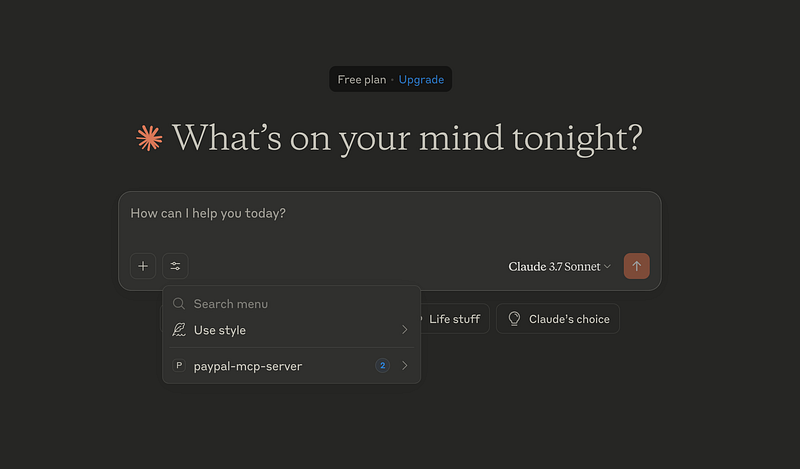
With the setup complete, I initiated a simple query by instructing Claude Desktop to compare my PayPal expenses.
How do you compare my expenses during last Feb and this Feb using Paypal?
Claude Desktop, with the help of LLM, identified the appropriate tool — listTransaction—from the PayPal MCP server and prompted me for consent before executing it, similar to how VS Code requested confirmation in the earlier setup.

After I granted consent, the tool was executed multiple times, and the results were returned as a well-structured natural language summary comparing my expenses.
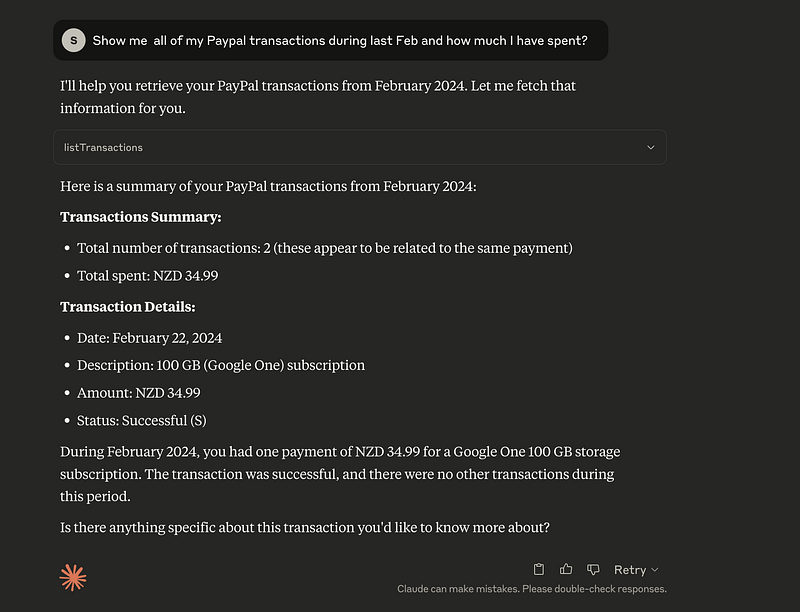
This section demonstrated how a remote MCP server like PayPal’s can operate independently or in combination with other MCP servers to complete multi-step, real-world tasks using natural language input.
The Security Flow
To start this section, first let’s look at how each component is integrated with the others during the above demonstration. As the following diagram illustrates, we have locally installed Claude Desktop. Then, Claude Desktop is configured to connect to the Paypal remote MCP server hosted within Paypal infrastructure, and the Paypal MCP server in turn connects with Paypal backend APIs. Claude Desktop communicates with the Paypal remote MCP server using the HTTP protocol over the internet. This also means that, in addition to using the encrypted transport mechanism provided by TLS (HTTPS), the HTTP endpoint of the Paypal remote MCP server must use some sort of application-level security mechanism. This requirement is fundamentally not different from the endpoint security concepts we’ve been using with APIs for some time now.
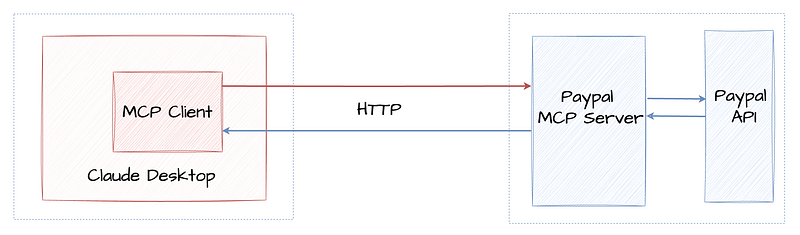
The MCP host application—Claude Desktop, in our case—hides most of the complexities related to security and only prompt when an interaction from a end user is required. In this section, we are going to unwrap MCP security and use Postman so we can clearly observe how security has been implemented.
As the first exercise of this section, let’s assume there is no security requirement and make a call to the HTTP endpoint exposed by the Paypal MCP server which is technically known as the MCP server endpoint. As shown below, you can find the MCP endpoint of the Paypal MCP server in the Claude Desktop configuration file.
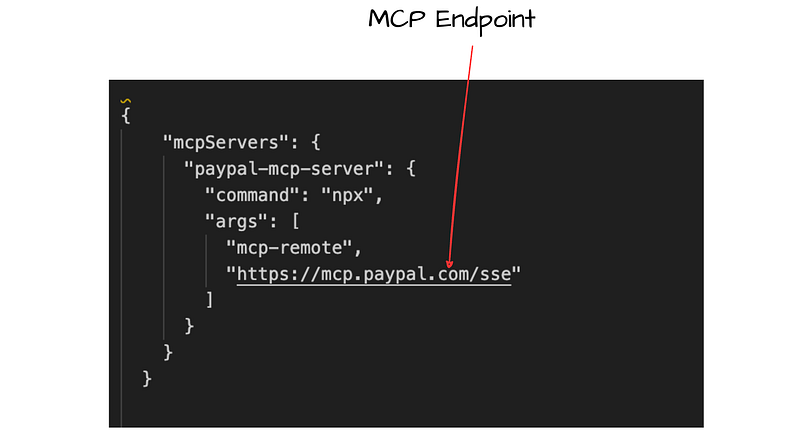
Then, you can send an HTTP request to the above MCP endpoint using Postman or a tool like cURL as shown below.
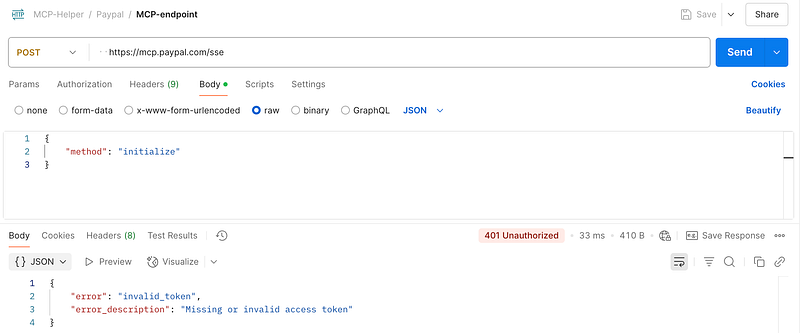
If you use Postman, you will likely get a response similar to the screenshot shown above — with an HTTP 401 Unauthorized error. It also states that either no access token was provided, or the one provided is invalid. In our case, we know that no token was provided with the request.
From this, it’s clear that we first need to get an access token from Paypal before sending any messages to the Paypal MCP server. But here’s the catch: how do we know the details of getting an access token from Paypal?
And yet, we know from the previous section that Claude Desktop somehow figured this out and obtained a valid access token, as we saw the results.
This brings us to a critical question, how did Claude Desktop manage to figure out the details of gettting an access token from Paypal?
Metadata Discovery (2025–03–26 revision/2025–04–26 auth changes)
Note: This section is based on the 2025–03–26 revision of the MCP protocol and changes introduced to the auth spec on 2025–04–26. Details may change in future revisions of the MCP protocol. (Date — 12/05/2025)
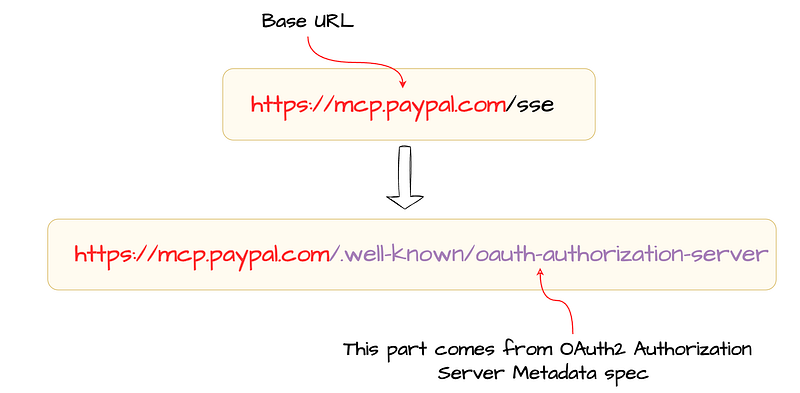
Section 2.3.2 of the MCP Authorization specification explains how an MCP client can determine the endpoint URL of the server metadata that describe everything required to obtain an access token. In our case, Claude Desktop uses the following procedure to construct the server metadata endpoint :
- Derive the base URL by discarding any existing path components from the MCP server URL.
- Construct the metadata endpoint by appending
/.well-known/oauth-authorization-serverto the base URL, as described in the OAuth 2.0 Authorization Server Metadata specification.
This process is illustrated in the following diagram.
Now, we have the server metadata endpoint in our hand, so the next step is to simply send a request to this endpoint and check whether it would return any server metadata document for us to proceed. As shown below, you can use Postman or cURL to make this call.
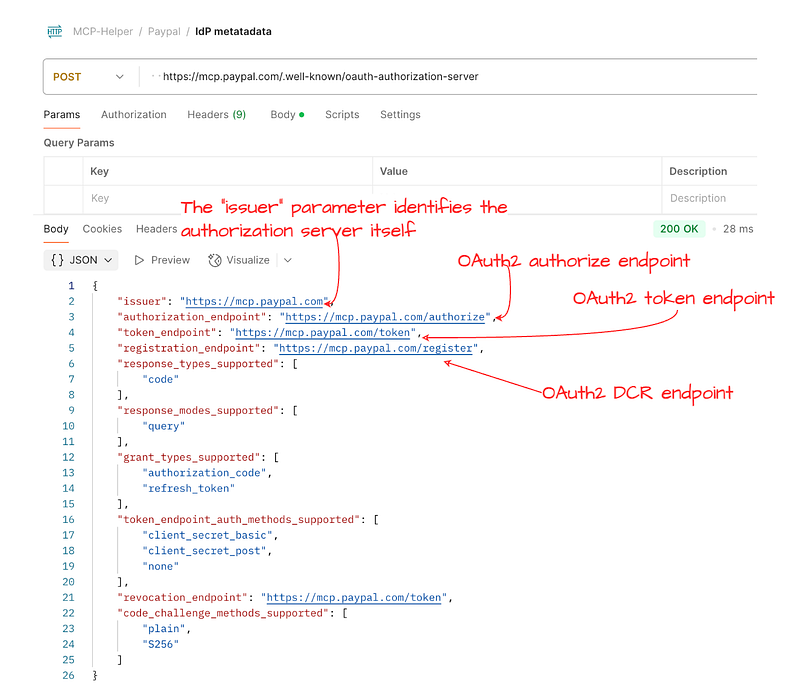
Once we receive the server metadata document, we can easily figure out the details required for the next steps such as:
- Client registration endpoint — OAuth2 requires prior registration of the client and for the client to have credentials in order to obtain access tokens.
- Authorization endpoint — As per OAuth2 spec, this is where the client (in our case, Claude Desktop) has to send the end user for authentication and to obtain any required consent.
- Token endpoint — This is used by OAuth2 clients (such as Claude Desktop in the previous section) to obtain an access token.
In addition to that, the server metadata document contains details such as supported grant types, supported client types, supported client authentication methods.
As per the MCP specification, MCP servers should and MCP clients must support the OAuth 2.0 Authorization Server Metadata specification. To learn more about this specification, you can read the this blog post that I wrote sometime back.
How do you discover the OAuth2 server configuration?
_This is the 2nd post of my blog series about the OAuth2; reading the first post may help you to understand this current…_sagarag.medium.com
When a server doesn’t support the OAuth2 Authorization Server Metadata specification, the MCP specification defines a fallback mechanism to determine the required endpoints such as registration, authorization, and token endpoints.
Metadata Discovery (in future revisions)
Soon after the release of the 2025–03–26 revision of the MCP protocol, there were a lot of discussions initiated around the authorization specification of the MCP protocol. As per the current revision, the authorization capabilities — such as returning the authorization server metadata, dynamic client registration endpoints, and authorization and token endpoints — are all defined as part of the MCP server role. In simple terms, authorization is tightly coupled with the MCP server role.
In contrast, OAuth2 — which is now widely adopted — defines two separate roles: Authorization Server (AS) and Resource Server (RS), offering a great degree of flexibility for implementers. Even in OAuth2, the spec highlights that it’s possible for an implementer to build both the Authorization Server and Resource Server together, where a single entity plays both roles. However, from the specification’s perspective, these are two distinct roles, providing the advantage of allowing two separate entities to handle them independently.
If we map OAuth2 terminology to MCP, the tools, prompts, and resources exposed by an MCP can be considered as playing the Resource Server (RS) role, while the authorization capabilities defined by MCP are akin to the Authorization Server (AS) role. The issue, then, is that in the MCP server, both of these roles are defined as one.
One potential reason for this design decision could be to enable the metadata discovery mechanism — described earlier in this section — solely based on the MCP server URL provided to the host application. However, based on several discussions and opinions from identity experts, the behavior of this discovery mechanism has been changed in the draft MCP specification.
The draft specification does not define its own mechanism to discover the metadata endpoint URL. Instead, it employs the OAuth2 Protected Resource Metadata (PRM) specification for that purpose. This specification defines a standard mechanism for OAuth2 Resource Servers — in this case, the MCP server — to return a URL to its own metadata document (known as the Resource Server Metadata) as part of the initial 401 Unauthorized response. Eventually, this metadata document can be used to discover the location of the Authorization Server Metadata endpoint. The future revisions of the MCP specification will require you to implement the OAuth2 Protected Resource Metadata(PRM) specification as well. I’ve recently written a post about OAuth2 Protected Resource Metadata(PRM)
What is OAuth 2.0 Protected Resource Metadata (PRM)
_At the very core of the OAuth2 authorization framework is a mechanism that allows a client application to access a…_sagarag.medium.com
Client Registration
Proceeding to the next step, now we can register an OAuth2 client application by sending a simple request to the registration endpoint as per the OAuth2 Dynamic Client Registration protocol. As shown in the following figure, we have registered an OAuth2 confidential client and received client_id and client_secret as the response.
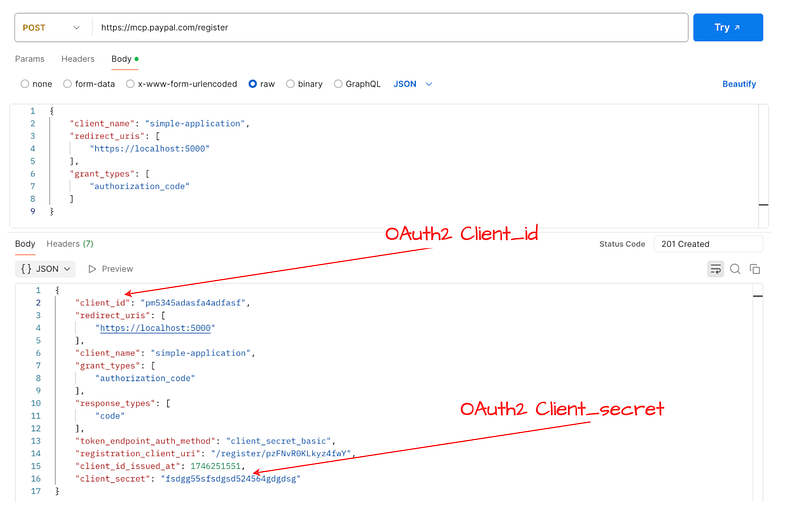
If you would like to read further, one of my previous posts covers DCR in detail.
How to register and manage OAuth2 clients?
_In the first post of this blog series about the OAuth2, I provided a comprehensive overview of the OAuth2 core…_sagarag.medium.com
Just to summarize our current progress so far:
- We derived the metadata endpoint of the server using the MCP server connection URL, which was the only URL available to us.
- Then we discovered the registration, authorization, and token endpoints from the server metadata.
- Finally, we managed to register an OAuth2 client application and received the required client credentials.
As the next step, we can now start the OAuth2 security flow. When an MCP server doesn’t support MCP authorization capabilities, the client application can obtain the required credentials through an out-of-band mechanism supported by the MCP server implementer.
One important point: usually you need these activities only once — when adding a new MCP server to your MCP host application. Once the OAuth2 application is registered and metadata is retrieved, the host application can securely persist them to be used with the OAuth2 grant type to obtain access tokens.
It’s worth highlighting a couple of other important points at this stage:
- Based on the capability of a client application to store and manage client secrets securely, you need to use either a public client or a confidential client.
- MCP specification uses the OAuth2.1 draft spec, not the OAuth2 spec, which means that regardless of whether you use a public client or a confidential client, you must use the PKCE extension with your OAuth2 flows.
Secure OAuth2: A Simple Story of Two Keys — PKCE
_This is the final post in my Secure OAuth2 blog series. I began this series by examining the security gaps in the…_sagarag.medium.com
Authorisztion Code Flow
There are many options available to try out the OAuth2 flow. In this case, for the OAuth2 Authorization Code Grant flow, we stick with Postman’s built-in OAuth2 configuration. We can fill in the Postman OAuth2 security settings using the information received from the server metadata — such as the authorization and token endpoints — as well as from the DCR response, including the grant type, client_id, client_secret, and registered callback URL (redirect_uri). Once these are added, we should see a screen similar to the one shown below.
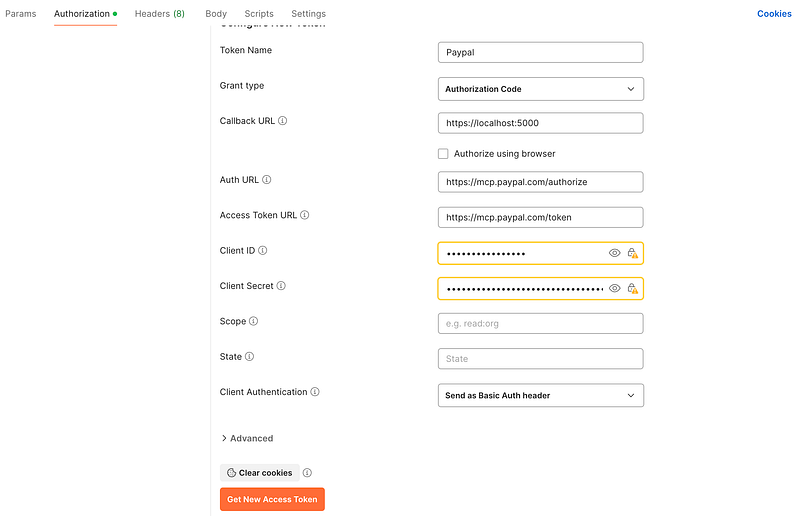
When you press the Get Access Token button, if everything is configured properly, you will see the following login screen from the PayPal IdP — not much different from a usual login screen you’ve likely seen before. Under the hood, Postman constructs an authorization request and sends it to the PayPal IdP. The IdP processes this request and returns a login screen to authenticate the end user.
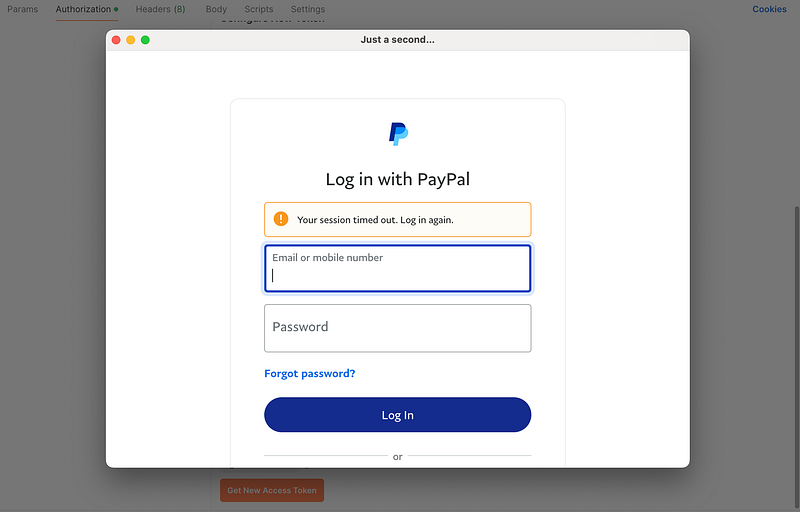
An example authorization request used by Postman is given below.
Once the end user logs into PayPal and consents to share the token with the client application — Claude Desktop, in our case — the PayPal returns an authorization code to the client via the browser.
Claude Desktop then makes a direct token call to the token endpoint, using the code received in the previous step to obtain an access token. An example token request is shown below.
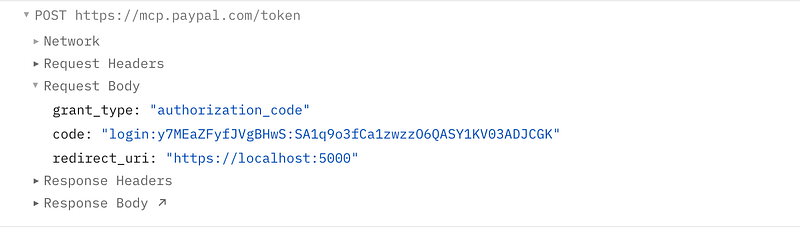
For simplicity, we used the embedded browser capabilities in Postman. However, in a real-world scenario, you don’t need to embed browser logic into your app. Instead, you can use the standard method — and that’s exactly what Claude Desktop does, as seen in the previous section. However, other than a couple of extra steps, the core security flow remains the same.
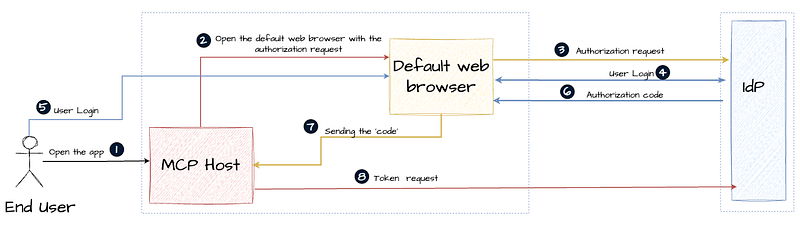
Here’s how a real world application handles this flow:
- During the application registration, application register the redirect URI in one of two ways: it either registers a custom URL scheme (e.g.,
appname://auth/callback) with the operating system, or it uses a port of a temporary local web server (e.g.,[http://localhost:3000/auth/callback](http://localhost:3000/auth/callback%29)) that it would start before the authorization flow starts. - Constructs the authorization request, acting as the OAuth2 client. Opens the system’s default web browser programmatically and navigates to the constructed OAuth2 authorization URL to send the end user to the MCP server. On macOS and Windows, this is typically done using system calls like
openorstartto ensure a seamless and secure experience. - The web browser sends the authorization request. The server validates the request and returns a login page to the user.
- Once the authentication and consent steps are completed, the server forwards the user back with
codeparameters to the registered redirect URI. If a custom URL scheme is used, the browser detects this and opens the registered app along with thecode. - The client application processes the
code, constructs a token request, and sends it to the token endpoint to receive an access token. - The client application receives an access token from.
This entire process is illustrated in the following diagram:
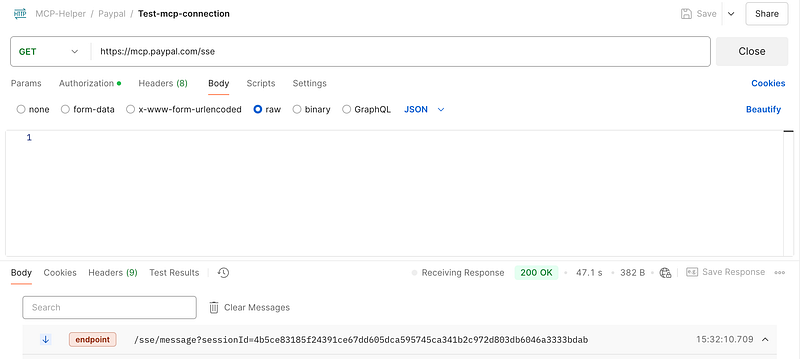
Finally, at this stage, we can run the very first message we sent to the MCP server again — this time with the access token. As shown in the following diagram, the client successfully connects to the MCP server, and a session is established.
The following sequence diagram illustrates the entire security flow that we discussed throughout this blog post.

At this point, we’ve covered most of the practical information you need to understand MCP security. I’ll skip the MCP messages and flows beyond this stage, as I’ve already covered them in great detail in my previous post.
Unwrapping MCP : A Walkthrough with the GitHub MCP Server
_We started to see the popping up of MCP servers from various organizations — from tools used in software development…_sagarag.medium.com
Just for completeness, below is the MCP request message for the listTransactions tool call:
{
“method”: “tools/call”,
“params”: {
“name”: “listTransactions”,
“arguments”: {
“start_date”: “2025-04-07T10:29:00Z”,
“end_date”: “2025-04-27T10:29:00Z”,
“page_size”: 10,
“page”: 1
},
“_meta”: {
“progressToken”: 12
}
}
}
And here is the corresponding response message:
{
“transaction_details”: [],
“account_number”: “fgdgt34413r4”,
“start_date”: “2025-04-07T10:29:00+0000”,
“end_date”: “2025-04-27T10:29:00+0000”,
“last_refreshed_datetime”: “2025-05-07T08:29:59+0000”,
“page”: 1,
“total_items”: 0,
“total_pages”: 0,
“links”: [
{
“href”: “https://api.paypal.com/v1/reporting/transactions?end\_date=2025-04-27T10%3A29%3A00Z&start\_date=2025-04-07T10%3A29%3A00Z&page\_size=10&page=1”,
“rel”: “self”,
“method”: “GET”
}
]
}
Wrap up
The foremost objective of this post is to elaborate on the security flow that must be implemented by MCP server developers and MCP host/client developers.
As per the current revision of the MCP protocol (2025–03–26), MCP servers and clients should support the OAuth 2.1 draft specification, the OAuth 2.0 Authorization Server Metadata specification, and the OAuth 2.0 Dynamic Client Registration specification as follows with HTTP transport which includes SSE and Streaming HTTP.
MCP Servers:
- Must support OAuth 2.1 Draft specification
- Should support OAuth 2.0 Authorization Server Metadata
- Should support OAuth 2.0 Dynamic Client Registration Protocol
MCP Clients:
- Must support OAuth 2.1 Draft specification
- Must support OAuth 2.0 Authorization Server Metadata
- Should support OAuth 2.0 Dynamic Client Registration Protocol
In addition, future revisions of the MCP protocol are likely to mandate support for the following specifications.
MCP Servers:
- Must support OAuth 2.0 Protected Resource Metadata
MCP Clients:
- Must support OAuth 2.0 Protected Resource Metadata
You can find my posts related to
I hope this post provides a practical insight into how you can tackle security when developing an MCP Server or MCP Host.
Stay tuned for the next post!