This is the final post in my Secure OAuth2 blog series. I began this series by examining the security gaps in the OAuth2 authorization code grant type, with the goal of introducing and advocating for a set of complementary specifications that have been developed over time to strengthen the flow — namely JAR, PAR, and JARM. Over the last four posts, we looked into each of these specs in detail, along with hands-on examples to help you apply them in practice using Asgardeo — cloud identity solution.
Secure OAuth2 : Is Authorization Code Grant Type Secure Enough?
_The authorization code grant type is generally considered as the most secure, widely used and commonly recommended…_sagarag.medium.com
In this final post, I want to talk about Proof Key for Code Exchange (PKCE).
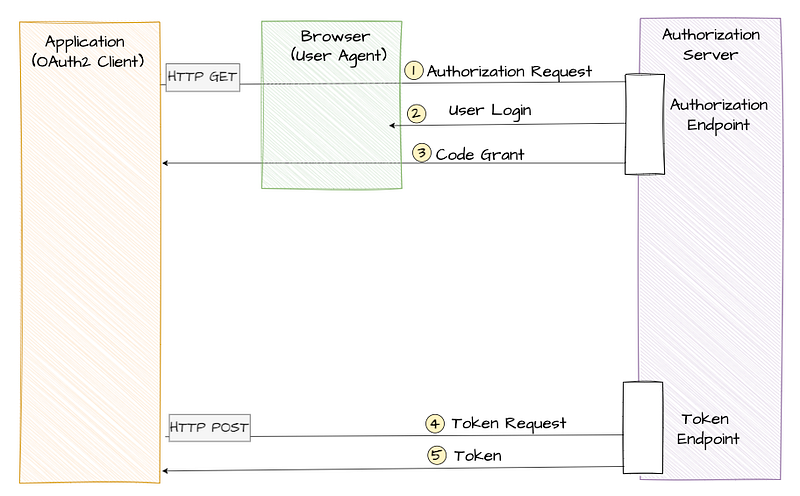
You’re probably already familiar with how the OAuth2 authorization code flow works: it involves two calls to the authorization server. First, the client application sends an authorization request via the user agent (typically a browser or app), and in return, it receives an authorization code. Then, in the second call, the client exchanges that code for tokens — such as an access token or ID token. The important point here is that without a valid authorization code, the client cannot obtain tokens.
_Now, here’s the key question:
_What if a malicious actor somehow gets hold of that authorization code — could they use it to get a token?
The short answer is: it depends. And we can’t completely rule out the possibility.
Let’s break it down.
If the application is a traditional server-side app — what we call a confidential client — it must authenticate itself when making the token request. Without the proper credentials, it won’t get a token. So even if someone manages to steal an authorization code, they wouldn’t be able to do much without the app’s credentials, making this a relatively safe scenario.
But that’s not the case for public clients — like mobile apps or single-page applications (SPAs) that run in the browser. These apps can’t securely store credentials, and therefore aren’t expected to authenticate themselves when calling the token endpoint. If an authorization code from such an app is intercepted, the attacker could exchange it for tokens using information like the client_id and redirect_uri, which are often publicly visible in the original authorization request.
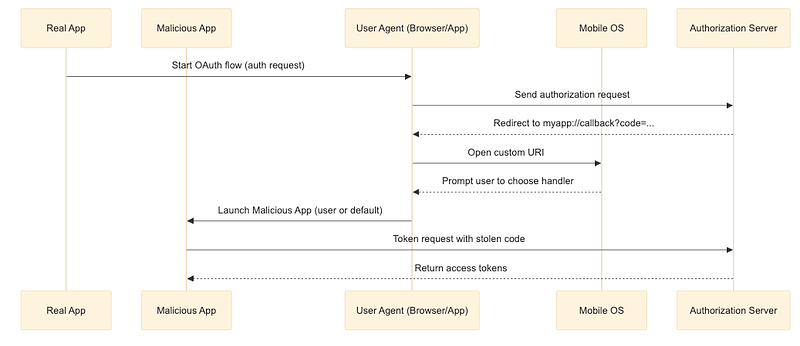
For instance, if you build mobile apps on Android or iOS, you’ll often register a custom URI scheme — such as myapp://callback— so your application can receive the authorization code after a user signs in. It’s a convenient feature, but it has a critical weakness: multiple apps can register the same URI. An attacker could publish a malicious app that also claims myapp://callback.
Here’s how the attack plays out:
- Your real app initiates the OAuth flow, sending the user to the authorization server.
- After login, the server redirects to
myapp://callback?code=…. - Because two apps both handle that URI, the operating system prompts the user (or defaults) to choose which app should open the link.
- If the malicious app is selected, it receives the authorization code instead of your app.
- The attacker’s app then calls the token endpoint — using its own credentials if required — to exchange the stolen code for valid tokens.
By the time your legitimate app sees the callback, the attacker already holds the tokens and can impersonate the user.
You can mitigate this with features like Android App Links or iOS Universal Links but the best approach would be to harden the OAuth2 flow itself to be resistant to such issues.
So what can we do?
One intuitive idea would be to somehow ensure that the same application that made the original authorization request is also the one making the token request — using some kind of a secret. But again, public clients can’t securely store secrets, which is the core issue here.
That’s exactly the problem that PKCE (pronounced “pixy”) is designed to solve based on cryptographic hashing.
At the heart of PKCE is the use of a hash function. Hash functions take an input and produce a fixed-length string of characters — called a hash — that appears random and is unique to that input. A key property of hash functions is that even a small change in the input produces a completely different hash, and most importantly, they are one-way functions — meaning you can’t reverse-engineer the original input from the hash.

PKCE works by requiring the client application to first generate a cryptographically random string typically between 43 to 128 characters that’s hard to guess. Then this random string is encoded using base64url schema to derive a string known as the code verifier. The client then applies a secure hash algorithm like SHA-256 to the code verifier and encodes the result using Base64 URL encoding. This final value is called the code challenge.
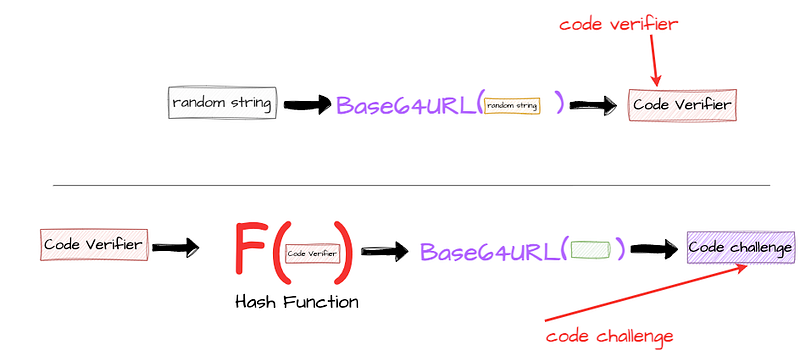
At this point, the client holds two values: the code verifier and the code challenge. The authorization request begins with the client sending the code challenge to the authorization server. For this, the PKCE specification introduces an authorization request parameter called code_challenge. A simplified example of such a request is shown below.
Note that to keep things simple, I’ve used the standard authorization request here. But it’s entirely possible — and recommended in high-security environments — to include this parameter inside a signed Request Object (as per the JAR specification) or within a PAR request, both of which we’ve already discussed in previous posts.
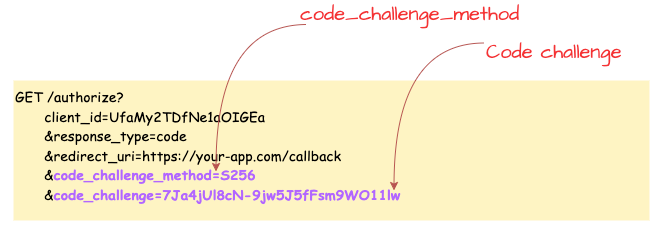
Once the authorization server receives the request, it processes it and stores the code_challenge value. If everything is valid and the user successfully authenticates, the server issues an authorization code to the client application. In the following diagram, I’ve given a sample authorization request with the code_challenge parameter. In addition to that, you can also see the optional code_challenge_method parameter in the request. This parameter is used to specify the code verifier transformation method, which is usually set to S256 implying SHA-256 hash algorithm.
One important point to highlight here is that the PKCE spec defines another transformation method called "plain". In that case, code_challenge = code_verifier. You shouldn’t use the "plain" transformation, as it doesn’t use the hash algorithm discussed above and doesn’t provide adequate security strengthening to the flow.
In the next phase — during the token request — the client sends the authorization code along with the previously generated code verifier. For this, the PKCE specification introduces another parameter, code_verifier, in the token request. A sample token request showing how to include this parameter is provided below.
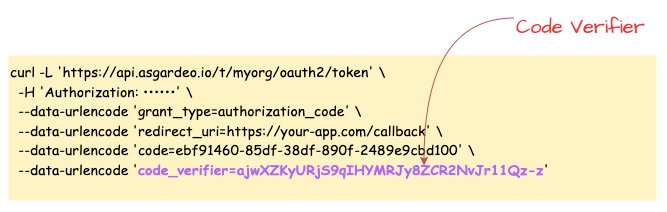
Once PKCE is enabled, the complete authorization code grant flow looks like the following diagram.

Here’s where the interesting validation step happens. The authorization server now hashes the code_verifier using the same algorithm and compares it against the stored code_challenge from the initial authorization request. If the values match, it confirms that the same client made both the authorization and token requests. Even if an attacker intercepted the authorization code, they wouldn’t be able to use it—because they wouldn’t have access to the original code verifier, which was never shared at that point.
PKCE Metadata Parameters and DCR
The next question we should find an answer to is how does a client application discover whether a particular authorization server supports the PKCE extension — and if so, which method should be used. The OAuth 2.0 Authorization Server Metadata specification defines a metadata parameter called code_challenge_methods_supported to imply PKCE support, and this parameter can be set to either S256 or plain.
How do you discover the OAuth2 server configuration?
_This is the 2nd post of my blog series about the OAuth2; reading the first post may help you to understand this current…_sagarag.medium.com
Once the authorization server’s support for PKCE is discovered by the client application, it can use the enforce_pkce and code_challenge_method DCR parameters during the client registration to inform the authorization server that the client expects to enforce PKCE and which transformation method it supports.
How to register and manage OAuth2 clients?
_In the first post of this blog series about the OAuth2, I provided a comprehensive overview of the OAuth2 core…_sagarag.medium.com
Compared to the other specifications I’ve discussed in this series, PKCE stands out as the most widely adopted. The good news is that support for PKCE is already built into most modern languages, frameworks, and SDKs. In many cases, it’s enabled by default or can be turned on with just a simple configuration. For instance, the Asgardeo React SDK has PKCE enabled by default, making it easier for developers to follow best practices without much extra effort. What’s also worth noting is that the OAuth 2.1 draft specification goes even further — it recommends using PKCE for all types of applications, not just public clients. This shows how important PKCE has become in securing the authorization code flow.
PKCE in Action
For this demo, I’ll be using Asgardeo — a cloud identity service by WSO2 which comes with a generous free tier, making it a great option to try out your identity use cases. Asgardeo fully supports the PKCE extension and enable it by default in Asgardeo SDKs so you don’t need to put any extra step to use PKCE with your applications.

Step 1 — Configure Asgardeo
If you don’t already have an Asgardeo account, you can sign up here. Once you’re logged in:
- Create a new Traditional Web Application from the left-side menu and Keep OpenID Connect selected as the protocol (this is the default). For the Authorized redirect URLs, enter
[https://myapp.io/login](https://myapp.io/login)as the value. Then save the application settings. - Next follow this guide to create a test user, which you’ll use later in this flow.
Step 2 — Set Up Postman
Next, you’ll need to configure Postman. First, Download this Postman collection for this demo. Open the collection and update the collection variables with the following values, which you can copy from your Asgardeo application:
[authorize_ep](https://myapp.io/login)— Token Endpoint URL from the Info tab.token_ep— Authorization Endpoint URL from the Info tab.client_id— Client ID protocol tab.client_secret— Client Secret protocol tab.
Step 3 — Execute the Flow
- First, execute the “Generate-PKCE” request in the above Postman collection, this call would’t go anywhere, it just uses to generate code verifier and code challenge to be used in the next step.
- Since Postman can’t simulate browser-based redirects, we’ll take a small manual step here. Open the Code Snippet tab for each request ( e.g — pkce-authz-code-grant-Browser ) from the right-hand menu in Postman and select cURL from the dropdown. Then copy the
locationvalue from the cURL snippet. Finally paste that URL into your browser’s address bar and hit Enter. - You should now be redirected to Asgardeo’s login screen. Enter the credentials of the test user you created earlier. If authentication is successful, you’ll be redirected to the callback URL with JWT authorization response which you can decode from your prefred JWT decoder tool.
- Go back to Postman and open the pkce-authz-code-token request. Paste the copied
codeinto thecodeparameter in the request body and send the request. If everything is set up correctly, you should receive a valid token from Asgardeo.
Note — as an exercise create a public client application in Asgardeo and try out the PKCE , you can refer Asgardeo docs as well.
With that, we’re reaching the end of this blog series where we discussed the security implications of the OAuth2 authorization code grant type and how complementary specifications developed over time can be used to mitigate these issues. Stay tuned for the next post with a new topic!
Other posts in the secure OAuth2 series
Read the other posts in Secure OAuth2 series.
Secure OAuth2 : Is Authorization Code Grant Type Secure Enough?
_The authorization code grant type is generally considered as the most secure, widely used and commonly recommended…_sagarag.medium.com
Secure OAuth2 (Part -2): Put it in a JAR (JWT-Secured Authorization Request)
_In my last post — which I published almost a year ago — I explored whether the authorization code grant type truly…_sagarag.medium.com
Secure OAuth2 (Part -3) : Push Authorization Request (PAR) to Rescue
_In the very first post of this series, I explored whether the authorization code grant type truly provides the highest…_sagarag.medium.com
Secure OAuth2 (Part -4) : Securing Response Using JWT Secured Authorization Response Mode (JARM)
_So far in this blog series, we’ve explored whether the OAuth2 authorization code grant type has any security…_sagarag.medium.com